D365 F&O acronyms decoded: LCS, PPAC, UDE, DMF, PQU and the rest
What LCS, PPAC, UDE, CHE, DMF, DIXF, PQU, RSAT and two dozen more F&O acronyms stand for, which ones changed meaning, and what each means for you today.
Applies to Terminology across F&O, LCS and the Power Platform admin center
Many Dynamics 365 finance and operations apps (F&O) acronyms expand cleanly: LCS is Lifecycle Services, PPAC the Power Platform admin center, PQU a proactive quality update. Others moved or collided: DMF and DIXF name the same data tool, GER became Electronic reporting, and CHE, UDE and UAT each have two or more Microsoft expansions. As of October 29, 2026, RSAT won't be supported after May 15, 2027, and new Finance, Supply Chain Management and Project Operations cloud customers start in PPAC.
Key facts- Microsoft's RSAT page describes the F&O data management framework (DMF) as 'also known as DIXF'. A March 2013 Microsoft blog post gave DIXF's old name: the AX 2012 Data Migration Framework.
- Microsoft's June 2024 UDE general availability post expands CHE as both 'cloud hosted environments' and 'Customer Hosted Environment', and UDE as both 'Unified Development Environment' and 'Unified Developer Experience'.
- No Microsoft page we fetched writes 'Platform update (PU)'. The expansion is inferred from usage such as 'PU74/10.0.50', and 10.0.13 being 'formerly referred to as Platform update 37'.
- F&O is community and D365World shorthand for Dynamics 365 finance and operations apps. Microsoft pages we fetched spell the name out, inconsistently: 'finance and operations apps', 'Finance & Operations' and others.
- As of October 29, 2026, Microsoft's Learn page for the Regression suite automation tool (RSAT) says RSAT is marked for deprecation and won't be supported after May 15, 2027.
- New Finance, Supply Chain Management and Project Operations customers can't create Lifecycle Services (LCS) cloud implementation projects since February 16, 2026, bar AX 2012 upgrades, tenant moves, approved exceptions.
Open Microsoft Learn’s data management overview and its subject is the “data management framework”, lowercase like any common noun. Scroll to the flight table and 12 of its 20 flight names start with DMF. One row is about SSIS memory use “when running DIXF jobs”, on the same page that files DIXF among the data tools of previous versions. Back in November 2012, a Microsoft blog announced version 2.0 of the AX 2012 Data Migration Framework. By March 2013 another Microsoft post had renamed it, old name in brackets. One tool, three names, and the old letters are still on the page.
That’s the pattern behind many acronyms on a Dynamics 365 finance and operations apps (F&O) project. Names change. Flight names, URL slugs, task names and namespaces don’t, and each Learn page expands its acronym in the present tense, as though it had always meant that. The product’s own string of names is another story.
What does each F&O acronym stand for?
The table below gives each acronym’s expansion as Microsoft writes it, what it names today and its status. “In current use” means a current Microsoft page we checked still uses the term, and every status, here and below, is as of October 29, 2026. Below the table, each acronym gets its back story and a line on what it means for you today.
| Acronym | What Microsoft writes | What it is today | Status (October 29, 2026) |
|---|---|---|---|
| DMF | data management framework | F&O’s import, export and migration tool | In current use |
| DIXF | Data Import/Export Framework | The AX 2012 name for the same tool (old name: Data Migration Framework) | Still on current Microsoft pages |
| GER | General Electronic Reporting | Now Electronic reporting (ER) | Renamed; letters survive in a URL and an LCS asset type |
| ER | Electronic reporting | Configurable electronic document formats | In current use |
| MR | Management Reporter | The server role that provides Financial reporting | Letters survive in a server role, data mart tasks and the MRDB database |
| AOT | Application Object Tree | AX 2012’s object tree; Learn contrasts it with Application Explorer in Visual Studio | Node still labelled AOT, per Learn |
| CDS | Common Data Service | Microsoft Dataverse | Renamed November 2020 |
| AAD | Azure Active Directory | Microsoft Entra ID | Rename announced July 11, 2023 |
| AX / AX7 | A product name, not expanded | Leftovers in namespaces and task names | In current code and docs |
| CHE | cloud hosted environment, and Customer Hosted Environment | A Tier 1 environment in your or a partner’s Azure subscription | Can’t migrate to PPAC; UDE or VHD replaces it |
| UDE | Three wordings (see below) | A one-developer X++ sandbox in PPAC | Generally available since June 2024 |
| FinOps | Not expanded in F&O tooling; “a blend of Finance and DevOps” on Learn’s cloud pages | A tooling label, and a cloud cost discipline | Both in current use |
| ISV | independent software vendor | An add-on vendor; also an AX 2012 layer | In current use |
| PU | Platform update (inferred from usage) | A platform release number, such as PU74 = 10.0.50 | Still used for platform milestones |
| F&O | Not on the Microsoft pages we fetched | Shorthand for finance and operations apps | Community and D365World shorthand |
| UAT | user acceptance testing, and Standard Acceptance Testing | A test phase, or the Tier 2 sandbox | In current use |
| LCS | Lifecycle Services | An application management portal | No new cloud implementation projects for new Finance, SCM and Project Operations customers since February 16, 2026 |
| PPAC | Power Platform admin center | LCS’s named replacement | In current use; LCS migration in preview |
| UPE | unified production environment | Production in PPAC | In current use |
| USE | unified sandbox environment | A sandbox in PPAC | In current use |
| VHD | virtual hard disk | A downloadable Tier 1 image you host yourself | In current use |
| LBD | local business data | On-premises environments | In current use |
| AOS | Application Object Server | Runs application logic for users and batch | In current use |
| ALM | application lifecycle management | Build, deploy and release | In current use |
| PQU | proactive quality update | A cumulative build of hotfixes | In current use |
| PEAP | Preview Early Access Program | Early access to monthly updates | In current use |
| RSAT | Regression suite automation tool | Regression testing | Deprecated; not supported after May 15, 2027 |
| ATL | Acceptance test library | X++ test helpers | In current use |
| BYOD | bring your own database | Entity export to your own Azure SQL database | In current use |
| OData | Open Data Protocol | The REST endpoint at /data | In current use |
| SSIS | SQL Server Integration Services | The engine under data management import and export | In current use |
| SSRS | SQL Server Reporting Services | The base of Document Reporting Services | In current use |
| CoC | Chain of Command | Method wrapping with next | Available since Platform update 9 |
| USMF, DEMF, DAT | Codes with descriptions, never expanded | Demo legal entities | HQUS and HQEU are the newer package-based versions |
Which acronyms kept their letters but changed their meaning?
DMF and DIXF, GER, MR, AOT, CDS, AAD and AX all name something that was renamed or replaced, and the old letters stayed behind in URLs, task names, tree nodes and namespaces.
DMF and DIXF: one tool, three names
DMF and DIXF name the same tool, and Microsoft says so: the Regression suite automation tool (RSAT) overview mentions “the data management framework (also known as DIXF)”, and the on-premises deployment overview lists an SSIS node serving “the Data Management Framework (DMF\DIXF)”, backslash and all. The archived AX 2012 user guide named it the Data Import/Export Framework, yet still captions both its diagrams “Data Migration Framework”. Learn’s BYOD page uses both current names, “Data import/export framework parameters” in one section and “Data management > Framework parameters” in another, and Alphavima’s May 2026 post on DMF exports introduces the framework as “also called DIXF”.
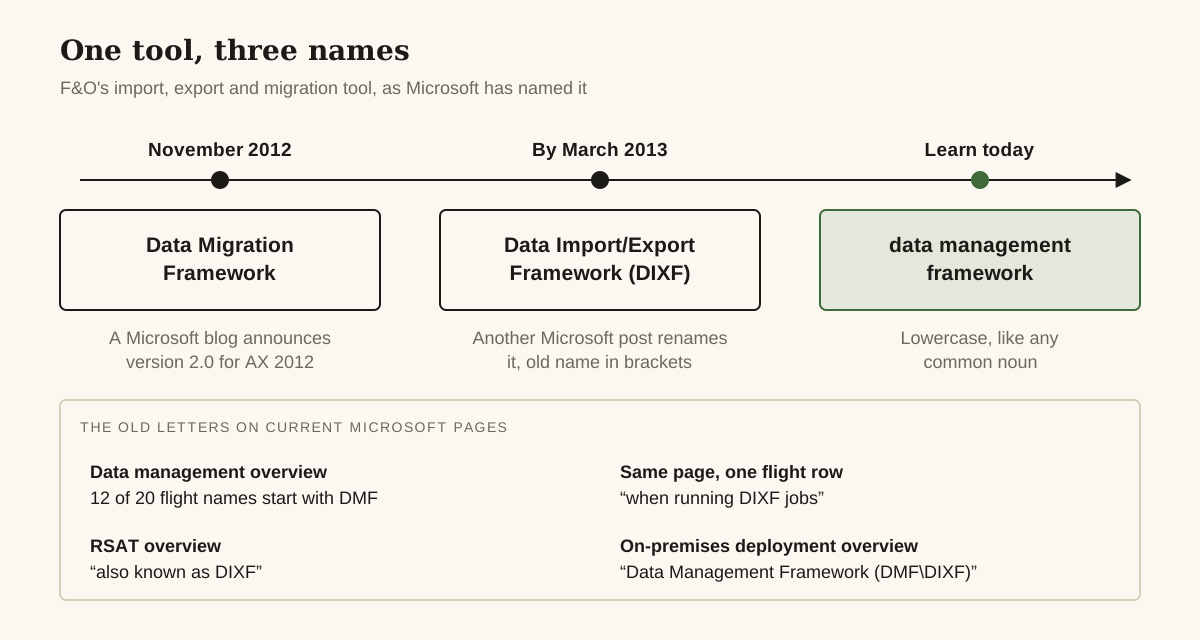
What it means today: search Learn for “data management framework” first, and add “DIXF” when the answer you need is older. (Both parameter labels come from Learn’s text; we haven’t checked which one your environment shows.)
GER and ER: a word dropped, the slug kept
GER is the older name for Electronic reporting (ER). An archived German-language Microsoft blog post from July 2017 is titled “Update platform for General Electronic Reporting (GER)”. The General has gone from the name but not from the plumbing: the “Electronic reporting (ER) overview” lives at a URL ending in general-electronic-reporting, and Learn’s March 2026 page on importing Microsoft’s ER configurations has you pick the “GER Configuration” asset type in the LCS Shared asset library.
What it means today: write Electronic reporting (ER), and look for GER when you fetch Microsoft’s configurations from LCS.
MR: Management Reporter, behind Financial reporting
MR stands for Management Reporter. The feature is called Financial reporting now, but Management Reporter hasn’t left the building. The on-premises overview lists a “Management Reporter (MR)” node that provides financial reporting functionality, the Financial reporting overview calls its database MRDB, and the Financial reporting FAQ lists a data mart task called “MR report definitions to AX7 Financial reports”, which fits Management Reporter, AX7 and Financial reports into seven words. We found no Microsoft sentence saying Management Reporter was renamed; those leftovers are the whole trail.
What it means today: search Learn for “Financial reporting”. An MR server role or data mart task doesn’t mean the page is out of date.
AOT: the tree that was replaced, and the node that wasn’t
Learn’s Application Explorer page introduces itself by contrast with the AX 2012 “Application Object Tree (AOT)”, then, a few lines later, tells you to switch views by right-clicking the AOT node. The tree hangs on elsewhere: the OData page says the endpoint exposes entities marked IsPublic “in the Application Object Tree (AOT)”, and LCS on-premises deployment asks for “the AOT packages to be deployed”.
What it means today: “find it in the AOT” means open Application Explorer in Visual Studio. The node label comes from Learn; we haven’t checked it in an environment.
CDS: renamed Dataverse in November 2020
Microsoft’s Power Platform blog announced on November 16, 2020 that Common Data Service had been renamed Microsoft Dataverse, and the vocabulary moved with it: entity became table, field became column. We found no Microsoft page that prints the letters beside the full name; the closest is a 2019 release note for the CDS Data Integrator.
What it means today: CDS means Dataverse. Watch the word “entity” on integration projects: Dataverse’s entities are tables now, while F&O’s integration objects are still data entities.
AAD: Microsoft Entra ID, and preferably no acronym
Microsoft announced on July 11, 2023 that Azure Active Directory would become Microsoft Entra ID, retiring “Azure Active Directory, Azure AD, and AAD” in one sentence. It would rather you used no acronym for the new name at all. If space forces one, it suggests ME-ID, then notes that ME-ID isn’t an official abbreviation either.
What it means today: write Microsoft Entra ID in full, and search for AAD as well when you follow setup steps written before the rename.
AX and AX7: the old product name in the plumbing
AX isn’t an acronym Microsoft expands; it’s Microsoft Dynamics AX, and “AX7” isn’t expanded anywhere we looked. Both live on in current material: the AX7 data mart task above, a Microsoft.Dynamics.AX.Resources namespace in OData action metadata, and the “Microsoft Dynamics AX Integration GitHub repository” the OData page points to.
What it means today: AX in a namespace, task name or repository doesn’t make a Learn page stale. It’s plumbing.
Which acronyms mean two different things?
CHE, UDE, FinOps, ISV and UAT each carry more than one reading, several of them from Microsoft itself. PU and F&O blur in their own ways.
CHE: cloud-hosted, or customer-hosted?
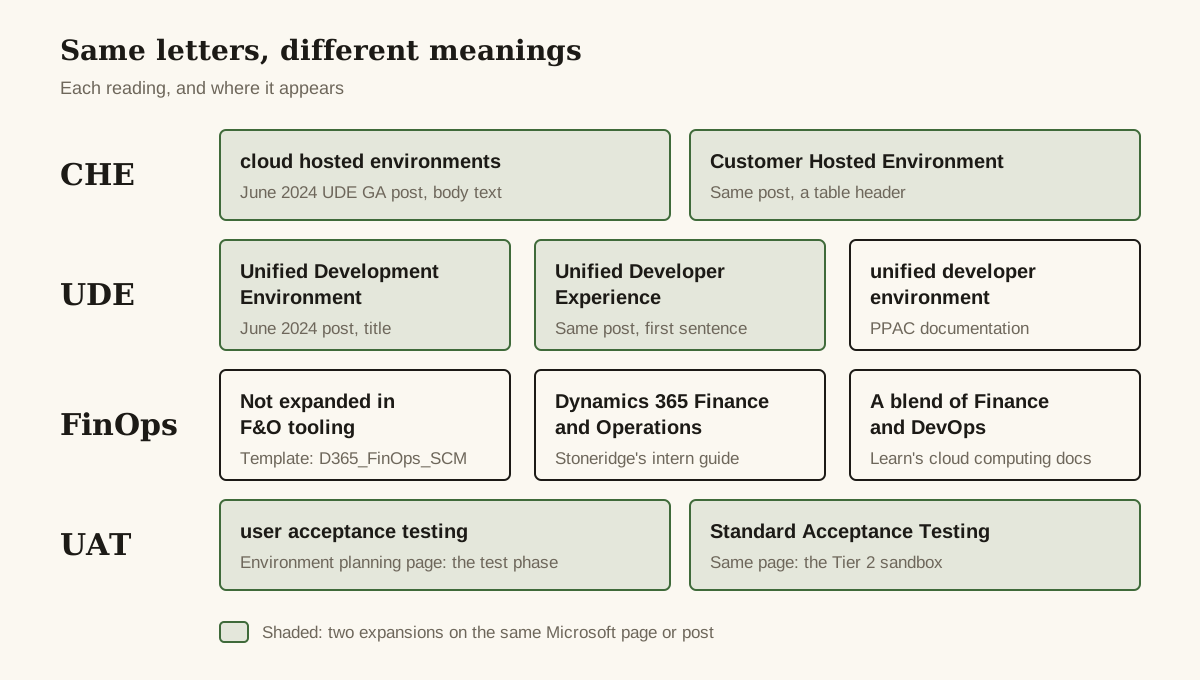
Microsoft expands CHE both ways in a single post: the June 6, 2024 developer blog post announcing UDE general availability says “cloud hosted environments (CHEs)” in its text and “Customer Hosted Environment (CHE)” in a table header. The Learn pages we checked spell out cloud-hosted, without the letters: Tier 1 environments you manage in a customer or partner Azure subscription. We found no source that explains “Customer Hosted”, so we won’t guess.
The C matters less than the direction. Learn says UDE replaces the cloud-hosted developer VMs previously deployed through LCS, the LCS-to-PPAC migration (preview) doesn’t support them, and Power Platform integration for cloud-hosted development environments is deprecated and no longer supported.
What it means today: if your team still develops on a CHE, plan the move to a UDE or a downloadable VHD, the two replacements the migration page points to. Our comparison of LCS and the Power Platform admin center covers what migrates and what doesn’t.
UDE: three wordings for one thing
UDE has three Microsoft wordings. The June 2024 developer blog post announcing UDE general availability supplies two: “Unified Development Environment” in its title and “Unified Developer Experience” in its first sentence. The PPAC documentation adds a third, unified developer environment: an X++ sandbox limited to a single AOS and meant for one developer, which Microsoft’s UDE FAQ says is generally available for version 10.0.39 and later. It isn’t the Power Platform “developer” environment type, which doesn’t support any Dynamics 365 workload.
What it means today: when someone says “developer environment” without the U, ask which one. Our guide to setting up a unified developer environment covers provisioning, Visual Studio and debugging.
FinOps: X++ tooling, or cloud cost management?
In F&O tooling, FinOps is a label nobody expands: PPAC templates such as D365_FinOps_Finance and D365_FinOps_SCM, a “Download Dynamics 365 FinOps assets” command on Visual Studio’s Tools menu, and an extension that ships as Microsoft.Dynamics.FinOps.ToolsVS2022.vsix. Stoneridge Software’s acronym guide for interns reads “D365 FinOps” as Dynamics 365 Finance and Operations. Learn’s cloud computing docs mean something else: a blend of Finance and DevOps, also called cloud cost management.
What it means today: add “Dynamics 365” or “X++” to any FinOps search on Learn, or you’ll be reading about cloud budgets.
ISV: a vendor, or a layer?
Usually ISV means independent software vendor, the sense Microsoft’s RSAT and environment planning pages use. In AX 2012 the letters also named a layer: the archived Layers page puts ISV between VAR and SLN in a stack running from USR to SYS, and says that when an ISV builds its own solution, the changes are saved in the ISV layer.
What it means today: ISV means an add-on vendor. “The ISV layer” is AX 2012 vocabulary.
PU: one release, several numbers
PU is read as Platform update, but no Microsoft page we fetched writes “Platform update (PU)” as a pair; the expansion is inferred from usage, such as “PU74/10.0.50 (build >= 7.0.8219.0)” on the 10.0.49 what’s-new page, and the 10.0.13 page noting those updates “were formerly referred to as Platform update 37”. Both pairs, PU37 with 10.0.13 and PU74 with 10.0.50, differ by 24, but no Microsoft page states that as a rule. Add build numbers (10.0.50’s own page gives 10.0.2919) and one release carries several numbers. Under One Version, Microsoft updates application and platform at the same time, so the PU number matters less than it did.
What it means today: translate a PU number to a 10.0.x version before you act on it. It still marks milestones: from PU75, Visual Studio 2026 is the only version Microsoft supports for X++ development, and the 10.0.49 page doesn’t say which release PU75 is.
F&O: our shorthand, not Microsoft’s
F&O is community and D365World shorthand for Dynamics 365 finance and operations apps. The Microsoft pages we fetched spell the name out, and not consistently: “Finance & Operations” in Learn page titles, “finance and operations apps” in body text, and both “Finance + Operations” and “Finance and Operations” for the on-premises product. Partners use the letters freely; the Alphavima post above has F&O in its title.
What it means today: F&O is fine in standups and tickets. For Learn searches and formal documents, use “finance and operations apps” or the product names, Dynamics 365 Finance and Dynamics 365 Supply Chain Management.
UAT: user acceptance testing, or Standard Acceptance Testing?
Most Microsoft pages we checked mean user acceptance testing. The environment planning page uses that expansion too, then calls the Tier 2 sandbox that comes with a subscription “One Standard Acceptance Testing (UAT) instance”. Same page, same letters, two expansions.
What it means today: UAT can mean the test phase or the Tier 2 sandbox. In a ticket, say which.
What do LCS, PPAC and the environment acronyms mean now?
Lifecycle Services (LCS) is the portal that new Finance, Supply Chain Management and Project Operations cloud customers no longer start in. The Power Platform admin center (PPAC) is its named replacement, and UPE, USE and UDE are the environment types you provision there.
LCS: Lifecycle Services
Microsoft Learn calls Lifecycle Services (LCS) an application management portal. Since February 16, 2026, new Dynamics 365 Finance, Supply Chain Management and Project Operations customers can’t create cloud implementation projects in LCS. Existing customers keep theirs. Commerce, AX 2012 upgrades, on-premises implementations and tenant-to-tenant migrations still go through LCS. Microsoft also runs an exception request process, with no guarantee of approval.
What it means today: LCS isn’t gone, and as of October 29, 2026 no source we read gives a shutdown date. New Finance, Supply Chain Management and Project Operations cloud customers start in PPAC, though.
PPAC: Power Platform admin center
Microsoft’s list of removed or deprecated platform features names the Power Platform admin center (PPAC) as the replacement for Lifecycle Services (LCS), and Learn dates the public preview of a self-service LCS-to-PPAC migration to September 2026. A Dynamics Community thread asks about PPAC reliability and the long-term LCS deprecation roadmap; the community answers stop short of dates.
What it means today: learn PPAC whether or not you migrate. Our LCS vs PPAC decision guide maps which task lives where and what the migration (preview) costs.
UPE and USE: production and sandbox, unified
A unified production environment (UPE) and a unified sandbox environment (USE) are the production and sandbox environment types in PPAC. Learn’s page on unified environment types says both scale up to 80 AOS instances, 40 interactive and 40 batch, and Learn lists a USE’s purposes as testing, UAT, staging and training. The type is fixed when you provision: a USE can’t become a UDE, or the other way round.
What it means today: decide what the environment is for before you provision it. There’s no converting it later.
VHD: virtual hard disk
The environment planning page lists “Environment image (VHD)”: Tier 1 environments hosted on-premises by using a virtual hard disk. The migration (preview) page offers a downloadable VHD as one of two replacements for cloud-hosted development.
What it means today: VHD is the developer environment you host yourself; UDE is the one Microsoft hosts.
LBD: local business data
Learn’s page on developing for on-premises environments says they “are also referred to as local business data (LBD) environments”. Nothing in the letters says on-premises.
What it means today: LBD means on-premises, one of the project types that still run through LCS.
AOS: Application Object Server
Microsoft’s on-premises overview describes Application Object Servers (AOS) as running application functionality “in client and batch”. Microsoft counts environments in AOS instances: a UDE has one, a UPE or USE scales up to 80, and the LCS-to-PPAC migration (preview) needs about 15 minutes of downtime per AOS instance.
What it means today: after an AOS restart, allow for a slow first OData call; the OData page says metadata isn’t cached yet.
ALM: application lifecycle management
Microsoft writes application lifecycle management (ALM) with varying capitalization: lowercase in the implementation guide, capitalized on the environment planning page. The migration (preview) page adds a third form, “Power Platform application lifecycle management (ALM)”.
What it means today: ALM covers how code gets built, deployed and released. On an F&O project, ask which toolchain someone means: LCS deployments, or Power Platform ALM.
What are PQU, PEAP, RSAT and ATL, and which ones are going away?
RSAT is the one going away: as of October 29, 2026, Microsoft won’t support it after May 15, 2027. PQU, PEAP and ATL are all in current use.
PQU: proactive quality update
Microsoft Learn defines proactive quality updates (PQUs) as cumulative builds of hotfixes that Microsoft delivers with near-zero downtime.
What it means today: moving an environment from LCS to PPAC doesn’t change how its PQUs are scheduled. PPAC’s unified admin overview says they’re scheduled the same way whether the environment is unified or managed through LCS.
PEAP: Preview Early Access Program
Microsoft Learn’s LCS training module describes the Preview Early Access Program (PEAP) as a way to get the latest monthly update just before it reaches the stabilization state, by joining the Insider Program at Experience Dynamics 365. Other Learn pages mention a First release program and a Release Validation Program (RVP); no source we read says these are the same thing.
What it means today: if someone suggests PEAP, RVP or First release, confirm which program they mean before anyone signs up.
RSAT: Regression suite automation tool
As of October 29, 2026, Microsoft’s Learn page for the Regression suite automation tool (RSAT) marks it for deprecation, with no support after May 15, 2027. The warning hasn’t reached everywhere: the LCS training unit on product updates, updated October 27, 2026, still recommends RSAT without it.
What it means today: if your regression testing runs on RSAT, put May 15, 2027 on the project plan now. A test library you start on it today gets less than seven months of support.
ATL: Acceptance test library
The Acceptance test library (ATL) is a set of X++ test helpers used with SysTest to write component tests, listed on the RSAT page as Acceptance test library resources.
What it means today: ATL is for developers. In test planning, it means tests written in X++ and run with SysTest.
Which data, reporting and code acronyms will you meet in your first sprint?
BYOD, OData, SSIS, SSRS and CoC, all in current use.
BYOD: bring your own database
Learn describes a feature that lets administrators export data entities (currently more than 1,700 are available) into their own Azure SQL database, and adds that it “is also known as bring your own database (BYOD)”. Its errors can surface as SSIS error codes such as DTS_E_OLEDBERROR.
What it means today: BYOD is the export. The Azure SQL database it lands in is yours to configure and own.
OData: Open Data Protocol
In F&O, Open Data Protocol (OData) is the endpoint at your environment’s root URL plus /data, which exposes the data entities marked IsPublic, per Learn’s OData page.
What it means today: OData is the REST route into F&O data entities. If an entity is missing from /data, check whether it’s marked public.
SSIS: SQL Server Integration Services
SQL Server Integration Services (SSIS) is the engine under data management import and export, which Microsoft’s on-premises overview lists as its own node. And there’s DIXF again: the DMFExecuteSSISInProc flight switches it back to running in-process for DIXF jobs.
What it means today: an SSIS error code in a data management or BYOD job points at the import/export engine underneath.
SSRS: SQL Server Reporting Services
SQL Server Reporting Services (SSRS) is the base of Document Reporting Services, and Learn’s current guidance still deploys those reports to the report server through the AOT.
What it means today: “the SSRS report” on an F&O project means a document report that runs on the report server.
CoC: Chain of Command
Chain of Command (CoC) is method wrapping in an extension class: the wrapper calls next to run the original. Learn says it’s available from Platform update 9, with nested-form wrapping from Platform update 16 and next inside try/catch from Platform update 21.
What it means today: all three milestones sit far below current releases (10.0.50 is PU74), so all three are available to you.
What do USMF, DEMF and DAT stand for?
Officially, nothing: Learn’s demo data overview gives the codes descriptions, not expansions. USMF is Contoso Entertainment System USA, DEMF is Contoso Entertainment System Germany, and DAT is Default Company. The rest come in families: codes ending in SI are Contoso Consulting, those ending in RT are Contoso Retail, and most ending in MF are Contoso Entertainment, though INMF is Contoso India. Dynamicspedia’s March 2020 post on the trial environment reads the first two letters as the country and the last two as manufacturing, service industries or retail. That’s a third-party reading; Microsoft doesn’t state it.
What it means today: in demo data built from packages, look for HQUS and HQEU instead. Learn says they’re based on the original USMF and DEMF data, minus the manufacturing focus in the name. If you need an environment to practice in, our MB-310 exam guide covers getting a Finance trial.
How do you search for an acronym that changed meaning?
Search Learn with both names: DIXF and data management framework, GER and Electronic reporting, MR and Financial reporting, AAD and Microsoft Entra ID. In tickets and specs, write the full name once before the letters. CHE, UDE and UAT each have more than one Microsoft expansion, and the person reading your ticket may have learned a different one.
Questions people ask
Is DIXF the same as DMF in Dynamics 365 F&O?
Yes, on a current project. Microsoft's RSAT page describes the data management framework as 'also known as DIXF', and the on-premises overview writes 'DMF\DIXF'. Data Import/Export Framework was the AX 2012 name for the tool.
What is the difference between a CHE and a UDE?
A cloud-hosted environment (CHE; one Microsoft post also expands it as Customer Hosted Environment) is a Tier 1 environment in a customer or partner Azure subscription, deployed through Lifecycle Services. A unified developer environment (UDE) is a single-developer X++ sandbox in the Power Platform admin center. Microsoft says UDE replaces cloud-hosted developer VMs, and its LCS-to-PPAC migration (preview) doesn't support them.
What does PQU stand for in Dynamics 365?
Proactive quality update. Microsoft describes PQUs as cumulative builds of hotfixes delivered with near-zero downtime, scheduled the same way whether an environment is managed in Lifecycle Services or in the Power Platform admin center.
Is GER the same as Electronic reporting (ER)?
Yes. A 2017 Microsoft blog title calls it General Electronic Reporting (GER); current Learn calls it Electronic reporting (ER). The old name survives in the overview page's URL, which ends in general-electronic-reporting, and in the 'GER Configuration' asset type in LCS.
What does PPAC stand for, and does it replace LCS?
PPAC is the Power Platform admin center. Microsoft's deprecation list names it as the replacement for Lifecycle Services, and new Finance, Supply Chain Management and Project Operations cloud customers have started there since February 16, 2026. As of October 29, 2026, no source we read gives an LCS shutdown date.
Sources and further reading
- Data management overviewMicrosoft Learn
- Data Import/Export Framework (DIXF) user guide (AX 2012, archived)Microsoft Learn
- AX 2012 Data Migration Framework (Microsoft archived blog)Microsoft Learn
- Microsoft Dynamics AX 2012 Data Import/Export Framework (Old name - Data Migration Framework) is now available on Information source (Microsoft archived blog)Microsoft Learn
- Bring your own database (BYOD)Microsoft Learn
- Regression suite automation tool (RSAT)Microsoft Learn
- On-premises deployment overviewMicrosoft Learn
- Electronic reporting (ER) overviewMicrosoft Learn
- Update platform for General Electronic Reporting (GER) (Microsoft archived blog)Microsoft Learn
- Financial reporting FAQMicrosoft Learn
- Financial reporting overviewMicrosoft Learn
- Application ExplorerMicrosoft Learn
- Open Data Protocol (OData)Microsoft Learn
- What is Microsoft Dataverse?Microsoft Learn
- Reshape the future of work with Microsoft Dataverse for Teams—now generally available (Microsoft Power Platform blog)Microsoft
- New name for Azure Active DirectoryMicrosoft Learn
- The Unified Development Environment is GA! (Microsoft Power Platform Developer Blog)Microsoft Developer Blogs
- Unified environment types and templates for finance and operations appsMicrosoft Learn
- Frequently asked questions (unified developer experience)Microsoft Learn
- Tutorial: Provision a new environment with an ERP-based templateMicrosoft Learn
- Install and configure development toolsMicrosoft Learn
- What is FinOps?Microsoft Learn
- Layers (AX 2012, archived)Microsoft Learn
- Class extension - Method wrapping and Chain of CommandMicrosoft Learn
- Platform updates for version 10.0.49Microsoft Learn
- Proactive quality updates overviewMicrosoft Learn
- Get product updates from Lifecycle Services (Microsoft Learn training)Microsoft Learn
- One Version service updates overviewMicrosoft Learn
- Stay current with Dynamics 365 service updates (implementation guide)Microsoft Learn
- Demo data overviewMicrosoft Learn
- Generate demo data by using data packagesMicrosoft Learn
- Document Reporting ServicesMicrosoft Learn
- Migrate finance and operations environments from Lifecycle Services to Power Platform admin center (preview)Microsoft Learn
- Removed or deprecated platform featuresMicrosoft Learn
- Lifecycle Services project creation freezeMicrosoft Learn
- Enable Power Platform integrationMicrosoft Learn
- Environment planningMicrosoft Learn
- Platform updates for version 10.0.13 (October 2020)Microsoft Learn
- Develop and deploy custom models to on-premises environmentsMicrosoft Learn
- Import Electronic reporting (ER) configurationsMicrosoft Learn
- Overview of unified admin experience for finance and operations appsMicrosoft Learn
- Platform updates for version 10.0.50Microsoft Learn
- CDS Data Integrator (April '19 release notes, archived)Microsoft Learn
What changed
First published . No changes since.
Was this page helpful?