Visual Studio 2026 and X++: what PU75 changes for F&O developers
Microsoft ends Visual Studio 2022 support for X++ from PU75. What that means for cloud-hosted VMs, UDE workstations and build pipelines, and what to check now.
Applies to X++ development in Visual Studio (CHE, UDE, build)
Microsoft's 10.0.49 release notes for Dynamics 365 finance and operations apps say Visual Studio 2022 is unsupported for X++ from platform update 75 (PU75), leaving only Visual Studio 2026; the cutoff read PU74 until September 11, 2026. As of October 29, 2026, no Microsoft page we found gives PU75's version or date, and the X++ requirements and unified developer environment install pages list only Visual Studio 2022. Azure Pipelines builds on windows-latest may reach Visual Studio 2026 first.
Key facts- Microsoft's 10.0.49 release notes for finance and operations apps say Visual Studio 2022 is unsupported for X++ from PU75, leaving only Visual Studio 2026; the cutoff read PU74 until an edit on September 11, 2026.
- Microsoft maps finance and operations platform updates PU72, PU73 and PU74 to 10.0.48, 10.0.49 and 10.0.50. As of October 29, 2026, we found no Microsoft page that states PU75's 10.0.x version or date.
- As of October 29, 2026, Microsoft's 10.0.47 notes still say Visual Studio 2026 isn't yet supported for F&O developer workloads, is known not to work with unified developer experience ones, and to stay on 2022.
- Azure DevOps docs (October 2026) say the windows-2025-vs2026 image became generally available on September 29, 2026 and windows-latest will point to it in the coming weeks; they name windows-2022 for Visual Studio 2022.
- Microsoft's hosted build guide for Dynamics 365 finance and operations apps tells teams to set the Azure Pipelines agent specification to windows-latest.
- Microsoft's Visual Studio requirements page for X++ says not to install Visual Studio manually on Lifecycle Services-deployed VMs or the downloadable VHD; deploy or download a new VM instead.
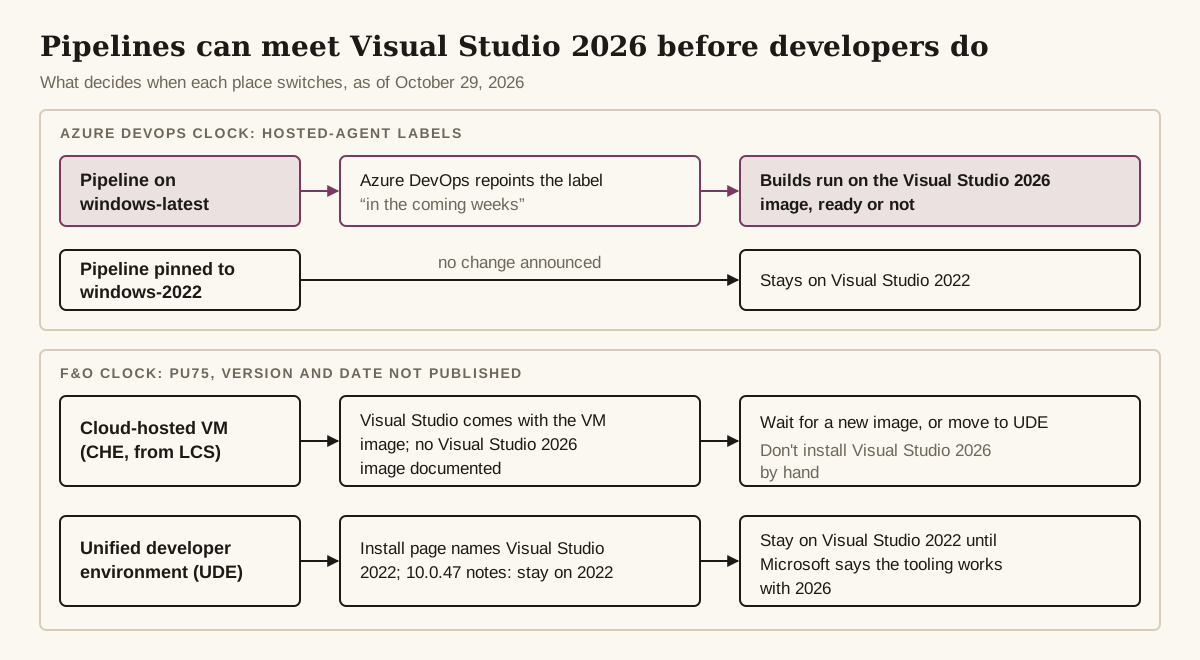
In Dynamics 365 finance and operations apps (F&O), the move to Visual Studio 2026 reaches a team in three places, on three different clocks. Build pipelines that follow Microsoft’s own hosted-build guide sit on windows-latest, so they can land on a Visual Studio 2026 image before any developer does. Cloud-hosted VMs depend on a Visual Studio 2026 image Microsoft hasn’t documented. UDE developers have the clearest instruction of all: wait.
What did Microsoft announce, and when?
Microsoft has said three different things about Visual Studio and X++ in 2026, and two of them are still live on Microsoft Learn. The current headline sits in the 10.0.49 platform release notes: “Starting with PU75, Microsoft no longer supports Microsoft Visual Studio 2022 for X++ development.” The next sentence on that page makes Visual Studio 2026 the only supported version.
| Date | What Microsoft said | Status | Where (page date) | Who it affects |
|---|---|---|---|---|
| August 29, 2024; effective PU65 / 10.0.41 | Extensions and Power Platform tools for Visual Studio versions before 2022 no longer shipped or supported | Deprecated | Removed or deprecated platform features (updated 2026-09-01) | Everyone (precedent) |
| January 6, 2026 | Visual Studio 2026 isn’t supported yet, is known not to work with the unified developer experience workloads; stay on 2022 until further notice | Not supported, never withdrawn | 10.0.47 release notes (updated 2026-09-12) | All X++ developers; UDE named as not working |
| July 22, 2026 | Visual Studio 2022 unsupported for X++ from PU74 | Announced, then changed | 10.0.49 release notes, first version | All X++ developers |
| September 11, 2026 | Same row, now PU75 | Announced | 10.0.49 release notes (updated 2026-10-27) | All X++ developers |
| September 29, 2026 | windows-2025-vs2026 hosted image generally available; windows-latest and windows-2025 to follow | GA, move pending | Microsoft-hosted agents for Azure Pipelines (updated 2026-10-13) | Build owners |
| As of October 29, 2026 | Requirements and UDE install pages list Visual Studio 2022 only | Unchanged | Visual Studio requirements for X++ (updated 2026-09-01); UDE install page (ms.date 2026-02-02) | All X++ developers |
The 10.0.47 and 10.0.49 rows contradict each other only if you read them as describing the same moment. Together they say Visual Studio 2026 will be the only supported version from PU75, and that, as of Microsoft’s last statement on it, the UDE workloads didn’t run on it. Nothing we found published since January closes that gap.
The 10.0.50 release notes (ms.date 2026-10-26) have no Visual Studio row. One unrelated item there does touch builds: client and server keyword warnings are now compilation errors. That’s a compiler change, not a Visual Studio one, but it will surface in the same pipelines.
Is the cutoff PU74 or PU75, and when is that?
The Visual Studio 2022 cutoff for X++ is PU75, not PU74, and as of October 29, 2026 no Microsoft page we found gives PU75’s 10.0.x version or date. Microsoft’s edit history for the 10.0.49 page shows the row went live on July 22, 2026 saying PU74 and was changed to PU75 on September 11, 2026. The commit gives no reason.
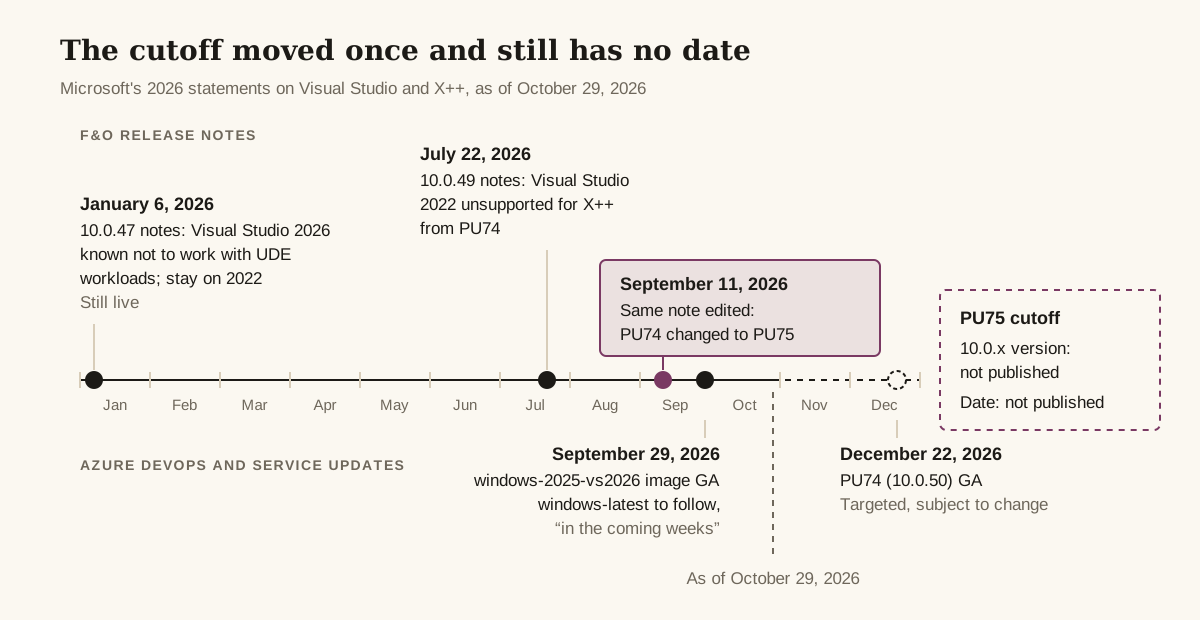
That edit is why some partner posts still say PU74. Logan Consulting’s August 2026 post frames the change as PU74 and ties it to 10.0.50, and its heading and body still say so as of October 29, 2026. It wasn’t wrong when it was written; Microsoft moved the line afterward.
The version number is a separate trap. The same 10.0.49 page maps platform updates to service updates in other rows:
| Platform update | Service update | Schedule |
|---|---|---|
| PU72 | 10.0.48 | n/a |
| PU73 | 10.0.49 | Preview July 27, 2026; GA September 11, 2026; first auto-update October 2, 2026 |
| PU74 | 10.0.50 | Preview October 23, 2026; GA December 22, 2026; first auto-update January 31, 2027 |
| PU75 | Not published | Not published |
The dates come from Microsoft’s service update availability table, which uses no platform update numbers and lists them as targeted dates, subject to change.
Don’t fill in the PU75 row by counting forward. As of October 29, 2026, no Microsoft page we found names its 10.0.x release or date, and guessing has already gone wrong once: the daxwork blog’s July 2026 post paired PU74 with 10.0.49, which disagrees with Microsoft’s own mapping.
What changes for developers on cloud-hosted VMs?
On a cloud-hosted environment (CHE), Visual Studio comes with the VM image, and Microsoft’s Visual Studio requirements page for X++ says not to install Visual Studio manually on VMs deployed from LCS or on the downloadable virtual hard disk (VHD); deploy or download a new VM instead.
The F&O extension isn’t yours to install either. It ships in the binary hotfix under DevToolsService\Scripts, and platform updates install it for you. To see what a VM has today, open Help > About Microsoft Visual Studio and find finance and operations Developer Tools in the list.
So the open question is whether an LCS image with Visual Studio 2026 will exist, and when. No Microsoft page we found says one exists or is planned. Microsoft’s documentation of earlier transitions is precedent, not a forecast:
| Transition | What Microsoft did |
|---|---|
| Visual Studio 2015 to 2017 | VMs deployed on 10.0.13 or later came with 2017. 10.0.16 was the last release for 2015, and VMs with only 2015 couldn’t update to 10.0.17 |
| Visual Studio 2017 to 2019 | Dev and build VMs deployed on 10.0.21 or later came with 2019. Build VMs without it had to be redeployed or replaced by the hosted pipeline |
| Before 2022 to 2022 | Older versions dropped from Microsoft’s VHDs and CHEs; effective PU65 / 10.0.41 |
The pattern, as Microsoft’s legacy pipeline page states it: new VMs ship with the newer Visual Studio preinstalled, and existing pipelines have to be updated by hand. What happens to a CHE that still has only Visual Studio 2022 when PU75 arrives isn’t documented.
Two things make this transition harder than the last ones. Microsoft’s LCS project creation freeze has stopped new customers from creating LCS projects since February 16, 2026 (Microsoft offers an exception request process), so a new customer without one has no CHE to wait on. And the LCS-to-Power Platform admin center (PPAC) migration (preview) doesn’t support CHEs; Microsoft points developers to a UDE or a downloadable VHD instead. The LCS vs PPAC comparison covers both.
Logan’s post lists three options: redeploy the dev VM once Microsoft updates its base images, install Visual Studio 2026 in place on the existing VM, or move to UDE, which it recommends. The in-place install contradicts Microsoft’s requirements page, so don’t plan around it. That leaves the architect’s two choices from the box: wait for an image, or move to UDE.
Of those two, waiting is the one that depends on an image no Microsoft page we found has announced. UDE is one of the two places Microsoft already points developers whose CHEs can’t move to PPAC, and a team without an LCS project has no CHE to wait for. Moving doesn’t get anyone onto Visual Studio 2026 sooner, though: UDE developers are waiting on Microsoft too, as the next section shows.
What changes for developers on a UDE?
For developers on a unified developer environment (UDE), nothing changes yet: stay on Visual Studio 2022, which Microsoft’s UDE install page still names as the prerequisite. On a UDE, the F&O extension downloads from the environment itself. The file lands as Microsoft.Dynamics.FinOps.ToolsVS2022.vsix in C:\Users\<User>\AppData\Local\Microsoft\Dynamics365\<ApplicationVersion>, and the year in that file name is one readiness signal to watch.
The UDE FAQ (ms.date 2026-07-23) is silent on which Visual Studio versions the tooling supports, and the 10.0.47 “known to not work” row is still live.
One signal points the other way, and it’s weaker than it looks. The Power Platform Tools for VS 2022 Marketplace listing (updated October 28, 2026) shows Visual Studio 2026 as well as 2022 under “Works with”, and the manifest declares an open-ended version range (2022 and anything later), as the July 2026 version did. So the manifest lets Power Platform Tools install on Visual Studio 2026 (we haven’t tested it). It says nothing about the F&O extension those tools download, and it isn’t Microsoft supporting the F&O workload there. Microsoft’s own Power Platform Tools install page still lists Visual Studio 2019 or 2022 as prerequisites, and we found no separate Visual Studio 2026 listing.
Atomic AX described a Visual Studio 2026 Community setup in February 2026 as “fairly easy”, but the post doesn’t say which environment type or F&O version it ran against. That’s one practitioner’s report, not confirmation.
Setup, deployment and debugging on a UDE are covered in the unified developer environment guide; none of it changes until Microsoft publishes a Visual Studio 2026 version of the tooling.
What happens to your build pipeline?
An X++ build pipeline on Azure Pipelines may switch to Visual Studio 2026 before your developers do, because Azure DevOps sets that timing, not the F&O release calendar. As of October 29, 2026, the Azure DevOps Microsoft-hosted agents page lists these Windows labels:
| Label | Visual Studio today | Documented future |
|---|---|---|
windows-2025-vs2026 | 2026 (GA September 29, 2026) | Dedicated 2026 image; no change announced |
windows-latest | 2022 (Windows Server 2025 image) | Will point to windows-2025-vs2026 “in the coming weeks” |
windows-2025 | 2022 | Will also start using 2026 |
windows-2022 | 2022 | No change announced; the documented way to keep 2022 |
The same page strongly recommends testing on windows-2025-vs2026 before the move. That matters for X++ because Microsoft’s own hosted build guide for F&O tells you to set the agent specification to windows-latest and the build task to “Visual Studio 2022 or the latest version”. Follow that guide today and your pipeline will run on the Visual Studio 2026 image whenever Azure DevOps flips the label.
Whether X++ compiles on that image with the current compiler NuGet packages isn’t documented anywhere we found, and we haven’t tested it. Treat it as unknown until your own test build says otherwise, and don’t let a production pipeline be the test: pin it to windows-2022 until a run on windows-2025-vs2026 has passed.
What to change, in order:
- Know your label. The Initialize job step log of any run shows which image it actually used.
- Pin deliberately. In the
VSBuild@1task,vsVersionaccepts18.0(Visual Studio 2026),17.0(Visual Studio 2022) orlatest, which is the default. The task reference says to choosewindows-2022if your team wants Visual Studio 2022 on hosted agents. - Run a parallel test build on
windows-2025-vs2026now, while your current label still gives you Visual Studio 2022. - Check imported samples. The Microsoft X++ pipeline samples that the hosted build guide points to still set
windows-2019andvsVersion: '16.0', and Azure DevOps retired that Windows Server 2019 image on December 31, 2025. If you imported them unchanged, fix both values. - Look for hardcoded paths. Visual Studio 2026 installs under
C:\Program Files\Microsoft Visual Studio\18\Enterprise, not...\2022\Enterprise. A runner-images issue from May 2026 shows GitHub Actions builds breaking on exactly that path when the image changed early; the suggested fix was resolving the path withvswhere. It’s a GitHub Actions report, not an F&O one, but custom build scripts are exposed the same way.
If any of your builds run in GitHub Actions, its windows-latest and windows-2025 labels moved to Visual Studio 2026 in June 2026, per the runner-images announcement.
On a legacy build VM, the MSBuild Version property on the Build the solution step shows which Visual Studio the pipeline uses. At past transitions, that value had to be updated by hand.
Which Visual Studio edition do you need, and how long is 2022 supported?
Microsoft’s F&O requirements page names Visual Studio 2022 Professional and Enterprise and doesn’t yet list any 2026 edition. Community isn’t on the list. If someone on the team runs it anyway, the Visual Studio servicing page adds two catches: Community has to be updated to the latest release within 180 days to stay usable, and the Long-Term Servicing Channel (LTSC) is offered only for Enterprise, Professional and Build Tools.
The lifecycle dates run the wrong way: Microsoft’s Visual Studio servicing page lists Visual Studio 2022 in mainstream support with end of support in January 2032, and Visual Studio 2026 with end of support in November 2028. From Visual Studio 2026 on, each annual release gets two years of support: one with features and fixes, one with security fixes only.
Put those together and F&O is moving to the IDE whose support ends first, years before Microsoft stops supporting the one it’s leaving.
What should you do before PU75?
Before PU75, F&O teams should run this five-step readiness checklist this quarter. Most of it is inventory, and none of it needs Visual Studio 2026 on anyone’s machine.
- List every developer machine with its Visual Studio version and edition, and the finance and operations Developer Tools version from Help > About Microsoft Visual Studio.
- Map each environment to its platform update with the mapping table above.
- Take every X++ pipeline through the five pipeline steps above. Keep the
windows-2025-vs2026test result, pass or fail, with any error text, and pinwindows-2022on production pipelines that need a known Visual Studio 2022 build until 2026 is tested. - Choose the CHE path: wait for a Microsoft image with Visual Studio 2026, or move developers to UDE.
- Leave UDE workstations on Visual Studio 2022 until Microsoft says the tooling works with 2026.
How will you know it’s safe to switch?
You’ll know it’s safe to move X++ development to Visual Studio 2026 when Microsoft changes one of the pages that currently say Visual Studio 2022. Watch for any of these:
- A platform release-notes row that withdraws or replaces the 10.0.47 “stay with 2022” statement.
- The requirements page listing Visual Studio 2026 editions.
- The UDE install page naming Visual Studio 2026 as a prerequisite, or the downloaded extension file appearing with a name other than
...ToolsVS2022.vsix. - An entry for Visual Studio 2022 on the Removed or deprecated platform features page. There’s none as of October 29, 2026.
- A release-notes page that names the 10.0.x version for PU75.
Until one of those pages changes, the safe setup is Visual Studio 2022 on developer machines and a tested, deliberately chosen label on every pipeline.
Pipelines have a signal of their own, and it isn’t a safe-to-switch one. The day the Azure DevOps hosted agents page maps windows-latest to Visual Studio 2026, every pipeline still on that label runs on the Visual Studio 2026 image, ready or not.
Questions people ask
Is Visual Studio 2026 supported for X++ development yet?
Not as of October 29, 2026. Microsoft's 10.0.47 release notes still say Visual Studio 2026 isn't supported yet and is known not to work with the unified developer experience workloads, and the X++ requirements page lists only Visual Studio 2022. The 10.0.49 notes make Visual Studio 2026 the only supported version from PU75, and we found no Microsoft page giving PU75's version or date.
Can I install Visual Studio 2026 on my cloud-hosted VM?
Microsoft's X++ requirements page says not to install Visual Studio manually on VMs deployed from Lifecycle Services or on the downloadable VHD; deploy or download a new VM instead. As of October 29, 2026, no Microsoft page we found documents a VM image with Visual Studio 2026, so the choice is to wait for one or move to a unified developer environment, where Microsoft still says to stay on Visual Studio 2022.
How do I check which Visual Studio and F&O developer tools version a machine has?
Open Help > About Microsoft Visual Studio and find finance and operations Developer Tools in the list. For a hosted build, the Initialize job step log of a run shows which image it used.
Sources and further reading
- Update the Visual Studio development toolsMicrosoft Learn
- We are deprecating earlier versions of Visual Studio for Dynamics 365 for Finance and Operations development (Microsoft Power Platform Developer Blog)Microsoft Developer Blogs
- Migrate finance and operations environments from Lifecycle Services to Power Platform admin center (preview)Microsoft Learn
What changed
First published . No changes since.
Was this page helpful?