LCS vs Power Platform admin center for F&O: what moved and what to use now
Where each F&O environment task lives now, LCS or PPAC, what the one-way migration (preview) costs you, and what to do this quarter if you're new or existing.
Applies to F&O environments in LCS and the Power Platform admin center
Since February 16, 2026, new Dynamics 365 Finance, Supply Chain Management and Project Operations customers start in the Power Platform admin center (PPAC), not Lifecycle Services (LCS). Existing customers: keep production and Commerce in LCS while the LCS-to-PPAC migration is in preview, build PPAC-side ALM, then migrate one low-risk sandbox; each move is one-way and the LCS slot isn't returned. As of October 28, 2026, no Microsoft source we checked dates an LCS shutdown or forced migration.
Key facts- Since February 16, 2026, new Dynamics 365 Finance, Supply Chain Management and Project Operations customers can't create Lifecycle Services (LCS) cloud implementation projects without an approved exception.
- Microsoft's self-service migration (preview) moves management of one LCS environment to the Power Platform admin center (PPAC); it is one-way, and the LCS environment slot isn't returned.
- Microsoft recommends against migrating production while the LCS-to-PPAC migration is in preview; Commerce and cloud-hosted environments aren't supported by the migration (preview).
- Microsoft says the LCS-to-PPAC migration (preview) changes only the control plane: the database isn't moved, and downtime is about 15 minutes per Application Object Server (AOS) instance.
- PPAC backups can't be downloaded as a .bak or .bacpac file. A PPAC copy brings code with data (only Dataverse data if the target's F&O app is still LCS-linked); an LCS database refresh copies data only.
- As of October 28, 2026, none of the Microsoft sources D365World checked gives an LCS shutdown date or a date by which existing customers must migrate to PPAC.
If you’re an existing Lifecycle Services (LCS) customer, the question is already on your screen. An environment’s Full details page in LCS now carries a Power Platform migration (Preview) section, and its button hands that environment’s management to the Power Platform admin center (PPAC). New customers never see it: their environments start in PPAC, which is Option 3 below.
Pressing the button takes a typed environment name and a confirmation. Undoing it isn’t possible: the migration (preview) is one-way, environment by environment, and the LCS slot the environment occupied isn’t returned. Waiting has no deadline attached: as of October 28, 2026 (the date every status in this note reflects), none of the Microsoft sources we checked gives an LCS shutdown date or a forced-migration date. When one side of a decision is permanent and the other has no clock on it, the burden of proof sits with pressing the button.
Is LCS being retired, and when?
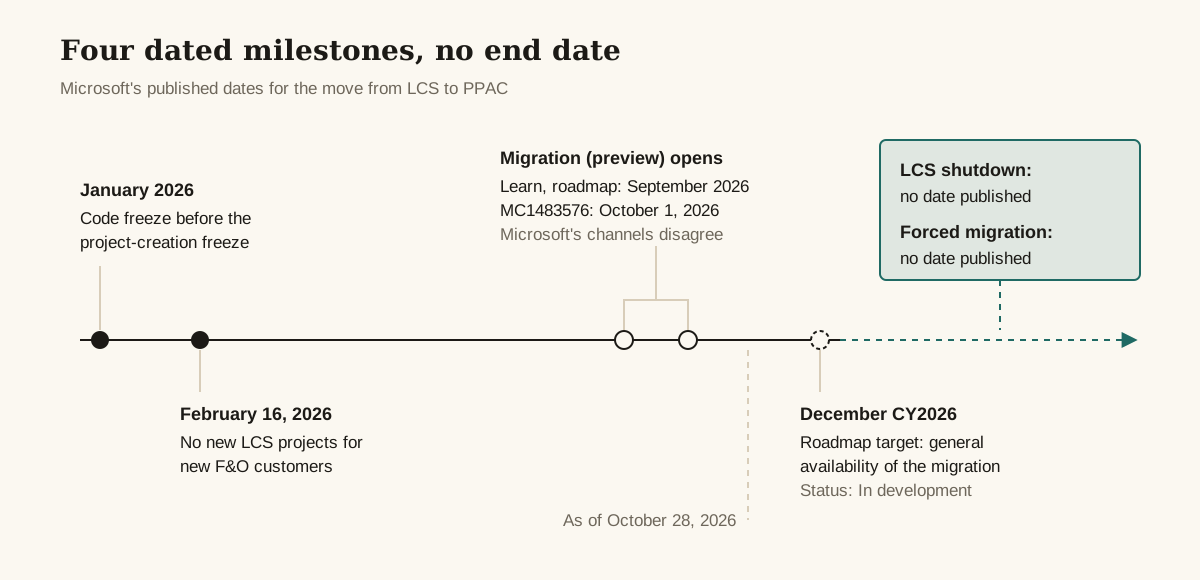
Lifecycle Services (LCS) is being replaced by the Power Platform admin center (PPAC) for finance and operations (F&O) environments, but as of October 28, 2026, Microsoft hasn’t said when LCS switches off: it has published four dated milestones, one with conflicting dates, and no shutdown date. Microsoft’s deprecation list files the change under its unified admin strategy. The first three milestones below have happened; the last is a roadmap target.
| Date | What happened | Source |
|---|---|---|
| January 2026 | Code freeze to prepare for the project-creation freeze | Learn, project creation freeze page |
| February 16, 2026 | No new LCS cloud implementation projects for new Dynamics 365 Finance, Supply Chain Management and Project Operations customers | Learn freeze page and deprecation list |
| September or October 1, 2026 | Self-service environment migration (preview) opens to existing LCS customers | Learn and the Microsoft 365 roadmap say September 2026; MC1483576 says October 1, 2026 |
| December CY2026 | Roadmap date for the general availability release of the migration feature, status “In development” | Microsoft 365 roadmap item 573244 |
Microsoft’s own channels disagree on the preview date. We could read MC1483576 (published September 30, 2026) only through a third-party mirror, because the original sits in the authenticated Message center, so treat the October 1 date with that caveat. Either way, the preview is live.
Two dates are missing from every source we read: when LCS stops working, and when existing customers must migrate. The roadmap date is for general availability of the migration (now in preview), not for the end of LCS. In a Dynamics Community forum thread, an MVP and a Super User give the same answer: it’s coming, but no date has been announced.
Partners are filling the gap with guesses. Cegeka wrote in October 2026 that it expects existing customers to migrate in the second half of 2027, without citing a Microsoft source. Treat that as one partner’s forecast.
One prerequisite is already in place for most tenants. Power Platform integration (PPI) has been required on every F&O environment since May 1, 2025, and Microsoft enables it automatically where it’s missing. Each LCS-managed sandbox and production environment gets a linked Power Platform environment, and Microsoft’s own wording is that the F&O app is migrated to that location over time.
Who is still allowed to create LCS projects?
Since February 16, 2026, every customer can still get an LCS project except new cloud implementations of Dynamics 365 Finance, Supply Chain Management and Project Operations, which need an approved exception. Microsoft’s freeze page lists who isn’t affected:
- Existing customers with active LCS projects, who keep using them
- Dynamics 365 Commerce projects, which are still created in LCS
- AX 2012 upgrade projects
- On-premises implementations
- Tenant-to-tenant migrations, which need an LCS project
A new customer with a business-critical reason can file the Lifecycle Services Project Creation Exception form (aka.ms/LCSProjectCreationException). Microsoft decides case by case and says approval isn’t guaranteed. Don’t build a project plan that depends on it.
Which environment tasks moved to PPAC, and which still need LCS?
Most LCS environment operations have a PPAC equivalent under a new name: Deploy becomes Provision, Database refresh becomes Copy, Database export becomes Backup, and Point-in-time restore becomes Restore. LCS project-level tools such as the asset library, business process modeler and methodology mostly don’t, and Microsoft’s unified admin overview points each of them somewhere else.
| Task | In LCS | In PPAC (or after migration) | Watch out for |
|---|---|---|---|
| Create an environment | Deploy, against a purchased slot | Provision, from a template, against capacity | Needs 1 GB free of both Operations and Dataverse database capacity |
| Refresh a sandbox from production | Database refresh (data only) | Copy (code always travels with data) | Different result for the same habit |
| Take a backup | Database export from a sandbox, a .bacpac you can download | Backup, custom or system-defined | Stays in the cloud; never a .bak or .bacpac |
| Roll back data | Point-in-time restore | Restore, custom or system-defined | |
| Reset, restore a deleted environment | n/a | Not yet implemented for environments with the Finance and Operations Provisioning App | |
| Promote a sandbox to production | n/a | Convert to production | PPAC only |
| Apply updates and proactive quality updates (PQUs) | LCS servicing | Manage on the Provisioning App | Only later versions offered; each version ships with its latest PQU |
| Deploy code | Deployable packages from the asset library | Azure Pipelines producing unified packages, imported into Dataverse | LCS workflows stop managing a migrated environment |
| Build | LCS build VMs | Microsoft-hosted agents in Azure DevOps | Compile and package only |
| Monitoring | LCS monitoring and diagnostics | PPAC after migration | LCS tooling is already partly disabled |
| Support tickets | LCS Support page | PPAC Help + Support | Partners move to delegated admin |
| Asset library | LCS | Azure DevOps for packages | No offline database backups |
| Business process modeler (BPM) | LCS | Business process catalog | Lives as an Azure DevOps template |
| Methodology, project users | LCS | Dynamics 365 Implementation Portal, or Azure DevOps for phases | Organization users go to the Microsoft 365 admin center |
| Task recorder files | LCS | Save locally | |
| Translation service | LCS (Dynamics 365 Translation Service) | Dynamics translation connector | The LCS service reached end of support on October 15, 2025 |
| Solution management, alerts | LCS | Microsoft Marketplace; support tickets |
Three rows deserve a second look.
Backups. A PPAC backup never leaves the cloud as a file: Microsoft’s unified admin overview says backups can’t be downloaded as a .bak or .bacpac. Any process that downloads a .bacpac from a sandbox, for example to restore it on a developer VM, loses its input; inside PPAC, the nearest substitute is copying one environment into another. Find out who depends on that before anything migrates.
Updates. In PPAC you apply updates through Manage on the Finance and Operations Provisioning App: you pick a later application version, and each version comes with its latest proactive quality update (PQU); Microsoft says there’s no way to get an earlier build of a version. PQU scheduling itself works the same for unified and LCS-managed environments.
Builds. LCS build VMs give way to Microsoft-hosted agents in Azure DevOps, and those agents only compile and package. No SysTest, no database sync, nothing that needs an AOS. The deployable-package task (version 3) can emit a Power Platform unified package and, optionally, an LCS-format package from the same run, which is how you keep both sides fed during the transition.
We found no Microsoft documentation of what happens to a project’s asset library, BPM libraries or task recordings once its environments have migrated. Export anything you still need before you find out.
Option 1: Stay on LCS for now
Keep managing the environment in LCS and change nothing yet. For existing production environments, this is the right answer today: Microsoft itself says not to migrate production during the preview.
Choose this when:
- It’s production, and the migration feature is still in preview.
- The environment uses Commerce. Commerce projects are still created in LCS, and Commerce environments aren’t supported for migration during the preview.
- You run on-premises, are mid-way through an AX 2012 upgrade, or need a tenant-to-tenant move. All three are outside the freeze and still run through LCS projects.
- Your PPAC-side application lifecycle management (ALM) doesn’t exist yet. Once a sandbox migrates, LCS deployment and promotion workflows no longer manage it.
Avoid when:
- You’re relying on LCS monitoring as a long-term plan. Microsoft is rebuilding LCS monitoring in Application Insights. Some activity queries have been disabled since September 2024, and the Health Metrics tab is in maintenance mode and no longer supported. Staying put already means losing some of the tooling.
- You’re relying on the LCS Support page. It’s being retired in stages (banner, then redirect, then block) in favor of PPAC Help + Support, with no calendar dates published.
Option 2: Migrate existing environments to PPAC (preview)
The self-service migration (preview) moves management of one LCS environment to PPAC. It changes the control plane only: Microsoft says the database isn’t moved and the infrastructure isn’t materially changed. It runs per environment and doesn’t migrate the LCS project. Plan for about 15 minutes of downtime per Application Object Server (AOS) instance, so environments with more instances take longer.
In LCS, the entry point is the environment’s Full details page, under Power Platform migration (Preview). Four prerequisite checks must show green before the migration (preview) can start. They cover the environment’s state (it must be in Deployed status), its link to a Power Platform environment, free database storage capacity, and your own role (you need to administer the linked Power Platform environment).
Then Migrate to Power Platform Admin Center opens the Confirm environment migration dialog, where you type the environment name and select Start migration. For the full steps and validation list, follow Microsoft’s migration guide. Dual-write doesn’t have to be enabled.
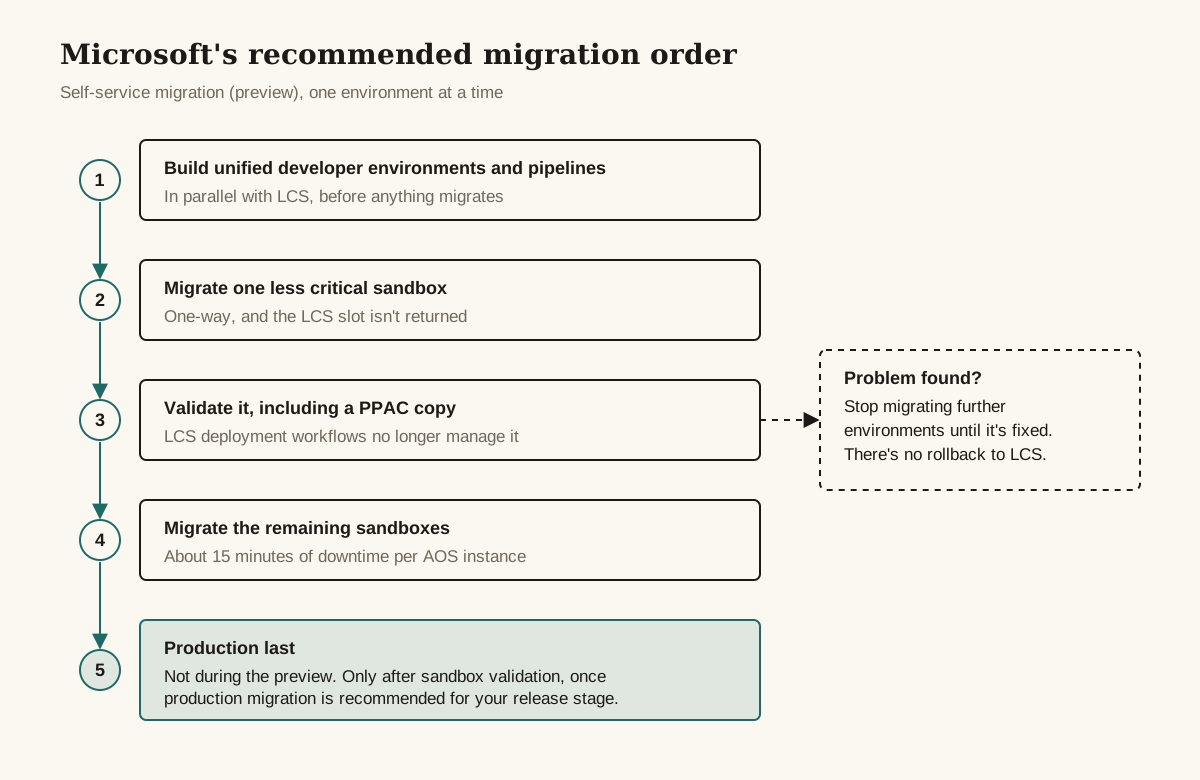
Microsoft’s recommended order is the part to copy: unified developer environments and pipelines first, in parallel with LCS; then one less critical sandbox; validate it, including a PPAC copy; then the remaining sandboxes; production last, once sandbox validation is done and production migration is recommended for your release stage.
Choose this when:
- It’s a self-service sandbox, and your Azure Pipelines already produce unified packages that deploy to unified environments.
- You want to learn the PPAC operating model on something you can afford to lose access to in LCS.
- You have Power Platform capacity to spare. A capacity deficit blocks the migration.
Avoid when:
- The environment uses Commerce. The prerequisite check doesn’t detect Commerce usage (see below), so confirm it yourself. The roadmap item lists Commerce among its products, but no Microsoft source we read says Commerce will be supported at general availability.
- It’s a cloud-hosted environment (CHE). Not supported; see Option 3.
- It’s production during the preview. Microsoft says the action might appear for production, and recommends against using it.
- Your team still deploys code through LCS. After migration, those workflows don’t manage the environment.
Option 3: Start in PPAC (new customers and new environments)
New Dynamics 365 Finance, Supply Chain Management and Project Operations customers start in PPAC by default. Existing customers can also provision new environments natively in PPAC instead of migrating old ones.
PPAC replaces LCS slots with capacity. You need a license that allows F&O provisioning, plus at least 1 GB free of both Operations and Dataverse database capacity, and Microsoft says there’s no strict limit on how many environments you can create. For what that capacity costs, go to the licensing guide, not a blog. Templates always install the latest available version of each app.
Developers move too. LCS cloud-hosted VMs can’t be migrated, can’t be the source of a copy into any unified environment, and PPI on them is deprecated and unsupported. Microsoft’s replacement is the unified developer environment (UDE) or a downloadable virtual hard disk (VHD); our guide to setting up a unified developer environment covers the provisioning gates and the Visual Studio side, and the Visual Studio 2026 and X++ release watch covers what the coming Visual Studio change means for cloud-hosted VMs.
To seed a new unified environment with real data, PPAC can copy an LCS sandbox or production environment into a UDE, and an LCS sandbox into a unified sandbox. The source must be set up through PPI and sit in the same region as the target. A community blog from June 2026 reports a missing PPI link as the most common blocker on this route.
Choose this when:
- You’re a new customer. Unless an exception is approved, there’s no LCS project to choose.
- You need new developer environments, whatever console your sandboxes are in.
- You want a fresh sandbox or test environment without touching the managed state of an existing LCS one.
Avoid when:
- The workload needs Commerce, on-premises, an AX 2012 upgrade or a tenant-to-tenant move. Those still go through LCS.
- You plan to copy into an environment whose F&O app is still LCS-linked. Microsoft says a PPAC copy then moves only Dataverse data, not F&O data.
Decision table: which option fits your situation?
| Situation | Stay on LCS | Migrate to PPAC now (preview) | Start natively in PPAC |
|---|---|---|---|
| New F&O, Supply Chain Management or Project Operations customer | Only with an approved exception | n/a | Default |
| Existing production environment | Recommended during preview | Not recommended by Microsoft during preview | n/a |
| Existing self-service sandbox | Fine while PPAC ALM is being built | Supported; start with the least critical one | Alternative: copy it into a new unified environment |
| Cloud-hosted dev VM | Keep only as a bridge; Power Platform integration on it is unsupported | Not supported | Replace with a UDE or downloadable VHD |
| LCS build VM | Keep only as a bridge; PPAC has no build environments | n/a | Microsoft-hosted agents in Azure DevOps |
| Environment uses Commerce | Yes | Don’t; the check won’t catch it | No; Commerce projects are still created in LCS |
Need a downloadable .bacpac | Database export from a sandbox to the asset library | Lost for that environment | Not available; backups stay in the cloud |
| Copy production into a dev environment | Refresh a sandbox from production, export a .bacpac, import it on the dev VM (data only) | PPAC copy brings code with data | LCS production to UDE is supported |
| Tenant-to-tenant move | Required | n/a | n/a |
| On-premises | Stays in LCS; outside the freeze | n/a | n/a |
What does it cost to change your mind later?
Migrating an environment from LCS to PPAC can’t be undone. Microsoft’s migration guide states that management can’t be returned to LCS through any customer-initiated operation, and that LCS shows the environment read-only afterwards. If validation finds a problem, Microsoft’s advice is to stop migrating further environments until it’s fixed, not to roll back.
Three more costs land the moment you migrate:
- The slot is gone. Microsoft’s migration guide says the LCS environment slot isn’t returned or made available for another environment, and the migrated environment starts consuming Power Platform capacity.
- ALM has to work on day one. LCS deployment and promotion stop managing the environment, and Microsoft points code deployment to Azure Pipelines and Power Platform deployment tooling, so the first code fix after migration goes that way whether or not your pipelines are ready.
- The bacpac habit ends for that environment, because PPAC backups aren’t downloadable.
Waiting costs less and stays reversible. An environment left in LCS keeps its slot and its LCS deployment workflows, though not the monitoring and support tooling Microsoft is already retiring (see Option 1). You can migrate it later while the self-service migration (preview) stays open, and we found no Microsoft end date for either that route or LCS itself. If waiting turns out to be wrong, it’s the cheaper mistake.
Questions to settle before you migrate anything
- Is PPI linked on every environment you plan to migrate, and who is an administrator of each linked Power Platform environment?
- Does the tenant show a storage capacity deficit, and who pays to clear it?
- Does any environment use Commerce functionality, confirmed by someone who knows the configuration rather than by the prerequisite check?
- Do your pipelines produce unified packages and deploy them to a unified environment today?
- Who exports
.bacpacfiles now, and what replaces that workflow? - Which LCS-only assets need a new home: asset library packages, BPM libraries, task recordings, methodology tracking, project users?
- Does anything still read data from the LCS Export to Data Lake add-in? Plan its replacement with our Synapse Link vs Fabric link guide.
- Have the developers moved off cloud-hosted VMs, or is that move on the plan with dates?
- Is there a maintenance window of about 15 minutes per AOS instance, plus slack, for each environment?
Questions people ask
Should I migrate production from LCS to PPAC now?
Not while the migration is in preview. Microsoft recommends against migrating production during the preview, even though the action might appear for production environments, and its recommended order puts production last, after sandbox validation.
Can Commerce environments be migrated to PPAC?
Not during the preview. Commerce environments aren't supported by the migration (preview), and Microsoft says the prerequisite check doesn't detect Commerce usage, so you have to confirm it yourself. New Commerce projects are still created in LCS.
Can I migrate a cloud-hosted development VM to PPAC?
No. Cloud-hosted environments aren't supported by the migration (preview) and can't be the source of a copy into any unified environment. Microsoft's replacement is a unified developer environment or a downloadable VHD.
Does the migration move my database?
No. Microsoft says the database isn't moved and the infrastructure isn't materially changed; the migration switches which control plane manages the environment. Expect about 15 minutes of downtime per AOS instance.
Can I copy an LCS environment into a unified environment instead of migrating it?
Yes. PPAC can copy an LCS sandbox or production environment into a unified developer environment, and an LCS sandbox into a unified sandbox. The source must be set up through Power Platform integration and sit in the same region as the target.
Sources and further reading
- Lifecycle Services project creation freezeMicrosoft Learn
- Overview of unified admin experience for finance and operations appsMicrosoft Learn
- Tutorial: Copy a Lifecycle Services environment to a unified environmentMicrosoft Learn
- Tutorial: Update the Finance and Operations Provisioning appMicrosoft Learn
- Monitoring and diagnostics tools in Lifecycle ServicesMicrosoft Learn
- Enable Power Platform integrationMicrosoft Learn
- Removed or deprecated platform featuresMicrosoft Learn
- Database and environment movements when Power Platform Integration is enabledMicrosoft Learn
- Export a databaseMicrosoft Learn
- Refresh databaseMicrosoft Learn
- Migration of the Lifecycle Services Support experience to Power Platform admin centerMicrosoft Learn
- Continuous integration and deployment (unified developer experience)Microsoft Learn
- Build automation that uses Microsoft-hosted agents and Azure PipelinesMicrosoft Learn
- Import the business process catalog into Azure DevOpsMicrosoft Learn
- What Is the Dynamics 365 Implementation Portal?Microsoft Learn
- Microsoft 365 roadmap item 573244: Migrate finance and operations environments from Lifecycle Services to Power Platform admin centerMicrosoft
What changed
- Key fact on PPAC copies made more precise: a copy into an environment whose F&O app is still LCS-linked moves only Dataverse data.
- First published.
Was this page helpful?