Synapse Link vs Fabric link for F&O: replacing Export to Data Lake
Export to Data Lake stops on November 30, 2026. Route F&O data to Fabric link, Synapse Link CSV or existing BYOD, and see the rework and lock-in each brings.
Applies to F&O data exports to a lake, Fabric or your own database
Export to Data Lake for Dynamics 365 finance and operations apps (F&O) stops on November 30, 2026, with no extensions. Microsoft recommends Link to Microsoft Fabric with low-latency sync for most organizations, and Azure Synapse Link for Dataverse when F&O data must land in your own storage: in our reading, its CSV incremental update folder, as Delta Lake output is closed to new customers. Keep working Bring your own database (BYOD) exports (no retirement date yet), but don't build new ones.
Key facts- The Export to Data Lake add-in for Dynamics 365 finance and operations apps stops permanently on November 30, 2026. Microsoft says it won't grant extensions; already-exported files stay in your lake.
- Microsoft's transition FAQ says the November 30, 2026 Export to Data Lake stop doesn't apply to Link to Microsoft Fabric or Azure Synapse Link for Dataverse, which both remain supported.
- Azure Synapse Link for Dataverse's Delta Lake (Parquet) output isn't available to new customers from October 15, 2026, and is removed in December 2027, per Microsoft. Eligibility is per Dataverse organization ID.
- As of October 29, 2026, Microsoft hasn't set a retirement date for F&O Bring your own database (BYOD) exports, but its transition FAQ recommends moving to Synapse Link or Fabric link.
- Microsoft says Fabric link and Synapse Link share one engine for F&O data: the old ID column becomes FnO_Id, deletes become soft deletes, and nvarchar(max) text is cut at 2,000 characters.
- Link to Microsoft Fabric (Fabric link) storage counts toward Dataverse database capacity, and Microsoft lists a Power BI Premium license or Fabric capacity as a prerequisite.
The useful question isn’t which Microsoft product is newer. It’s what reads your lake today. Power BI and Microsoft Fabric consumers belong on Link to Microsoft Fabric (Fabric link). A warehouse outside Microsoft’s stack that ingests change files belongs on the incremental update folder of Azure Synapse Link for Dataverse (Synapse Link). T-SQL jobs on a Bring your own database (BYOD) export can stay where they are for now. The one route we’d steer every new design away from is Synapse Link’s Delta Lake output, which Microsoft has already closed to new customers and scheduled for removal.
Settle it this week. With 32 days left as of October 29, 2026, a pilot that starts in mid-November leaves no time for a second attempt. That’s our reading of the dates, not a measured duration: no Microsoft page we read says how long the initial sync of a large table from Dynamics 365 finance and operations apps (F&O) takes, and Microsoft says it can’t guarantee data timing for high-volume processes such as master planning.
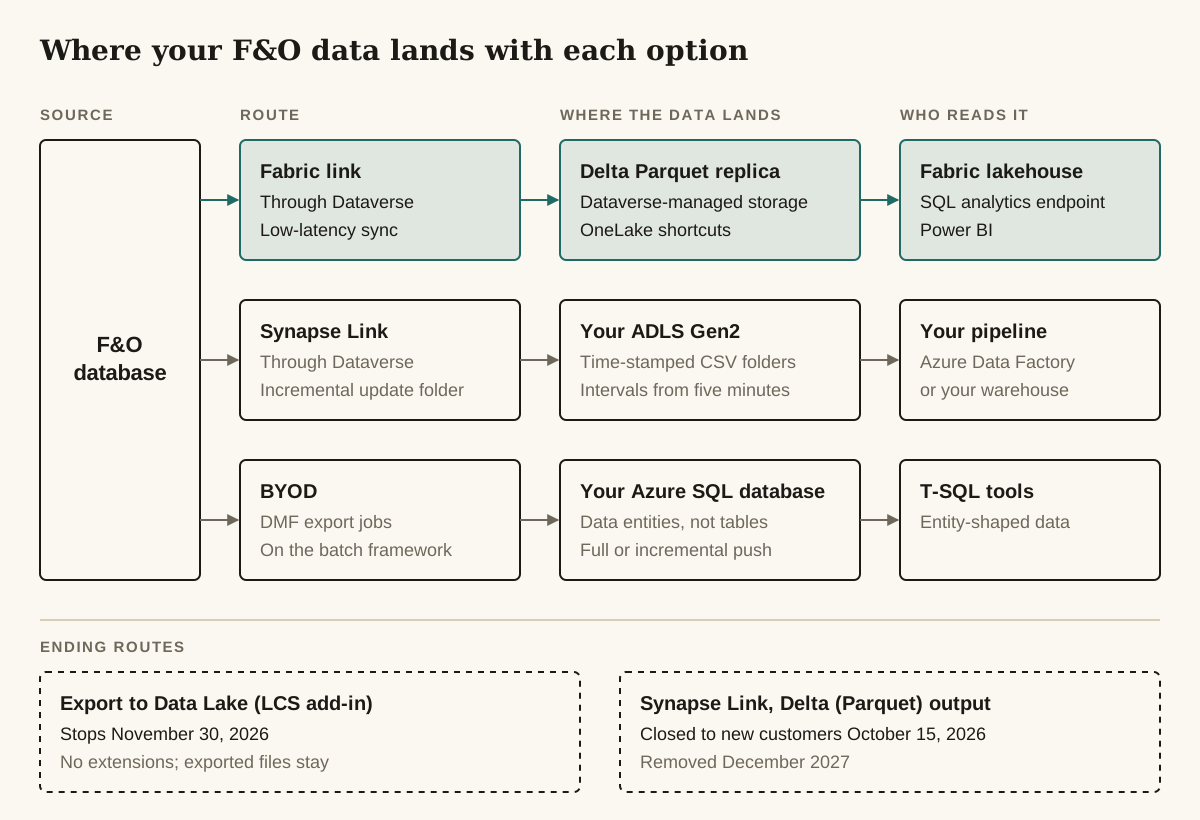
What reads your lake today?
Route each consumer of your Export to Data Lake files to its own replacement, not the whole tenant to one. One lake can feed readers that need different replacements, so a lake with two kinds of reader can end up with two answers. The routing below is ours, built from what Microsoft documents each option can do.
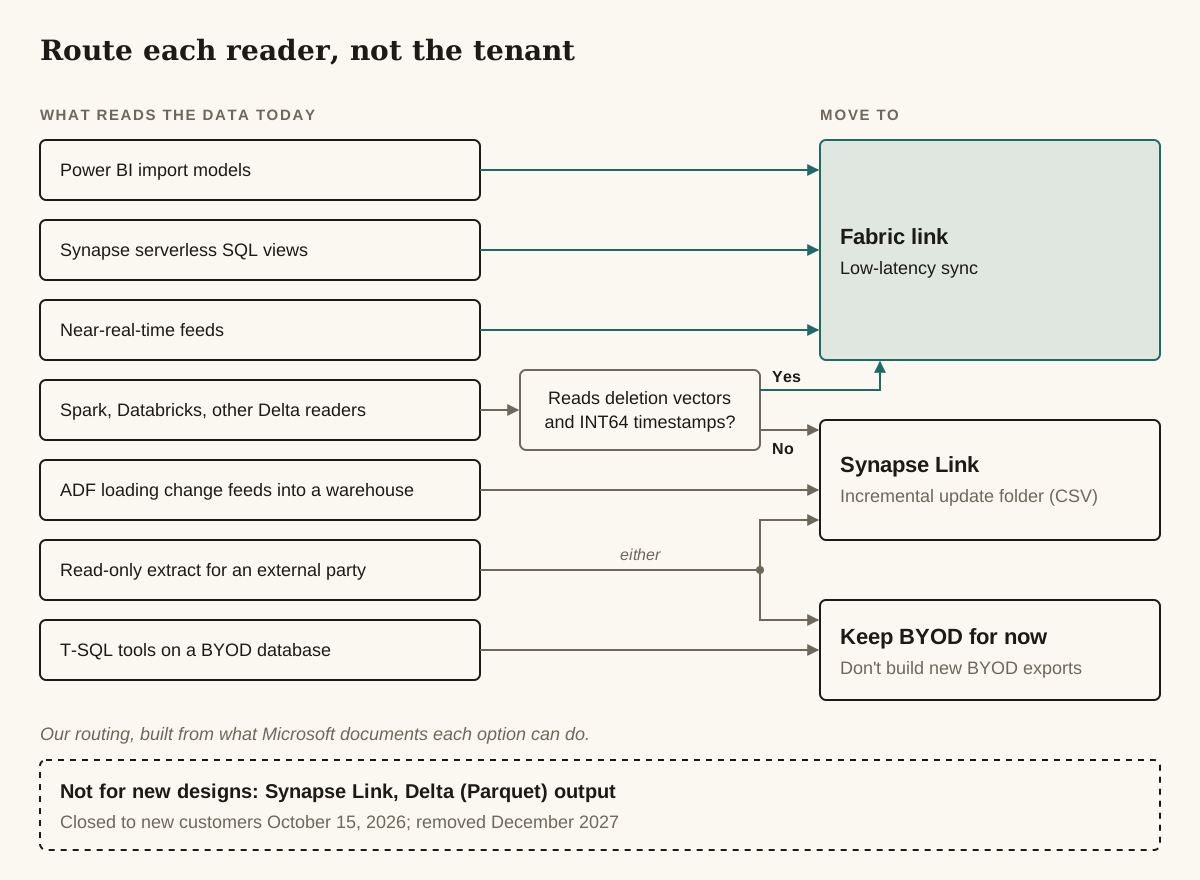
| What reads the data today | Move to | Main rework |
|---|---|---|
| Power BI import models fed from Export to Data Lake through a staging database | Fabric link with low-latency sync | Repoint reports at the lakehouse; handle renamed columns, soft deletes and case-sensitive names |
| Synapse serverless SQL views over the lake | Fabric link, with the views rebuilt on the Fabric SQL analytics endpoint | Serverless SQL doesn’t handle low-latency Delta tables in every scenario (see below) |
| Azure Data Factory loading change feeds into Azure SQL or a non-Microsoft warehouse | Synapse Link, incremental update folder (CSV) | Read closed time-stamped folders only; process soft deletes that carry no record body |
| Near-real-time feeds built on Export to Data Lake | Fabric link with low-latency sync | Measure latency under load before you rely on it |
| Spark, Databricks or other Delta readers | Fabric link if the reader handles deletion vectors and INT64 timestamps; otherwise Synapse Link CSV | Test the reader against low-latency Delta tables first |
| T-SQL tools on an entity-shaped BYOD database | Keep BYOD for now | None today; entity shapes need rebuilding when you leave |
| A read-only extract for an external party | Keep the BYOD export, or Synapse Link CSV into storage you share | Decide who owns the downstream pipeline |
The change-feed and near-real-time rows are Microsoft’s own instructions: the transition FAQ points change-feed consumers using non-Microsoft tools to Synapse Link incremental exports, and anyone who relied on Export to Data Lake for near-real-time updates to Fabric link with low-latency sync.
If what you’re replacing is really an integration (another system reading F&O data to act on it), an analytics export may be the wrong tool.
What stops on November 30, 2026, and what keeps running?
Only the Export to Data lake environment add-in for F&O, installed through Lifecycle Services (LCS), stops on November 30, 2026. Microsoft’s transition FAQ says the notice doesn’t touch Link to Fabric or Azure Synapse Link for Dataverse, which both remain supported, nor existing Fabric links still on the older sync engine. After the stop the add-in exports nothing new or changed; what it already wrote stays in your lake. The deprecated-features entry and the transition FAQ both rule out extensions.
Watch the names in older advice. Azure Synapse Link for Dataverse was itself called “Export to data lake” until Microsoft renamed it in May 2021, so an old forum answer may mean either product. Its own name is going too: Microsoft says the Synapse Link branding will retire soon, and the UI already says Link to Data lake.
The dates that matter, as Microsoft gives them:
- November 1, 2024: Export to Data Lake retired. Microsoft stopped developing it, but the add-in kept exporting.
- October 15, 2026: Synapse Link’s Delta Lake (Parquet) output closed to new customers.
- November 30, 2026: Export to Data Lake stops permanently.
- June 1, 2027: Synapse’s trusted-services access to Storage and Key Vault changes (first set for August 1, 2026).
- December 2027: the Delta Lake (Parquet) output is removed for everyone.
- BYOD: no retirement date.
Once the replacement is running, uninstall the Export to Data Lake add-in from the environment’s Environment Add-ins section in LCS. Microsoft says there’s no downtime or restart, the lake files stay, and switching off change data capture (CDC) on the add-in’s tables takes a while afterwards. Our LCS vs PPAC guide covers what still lives where if your environments are moving to the Power Platform admin center.
When is Fabric link the right answer?
Pick Fabric link for F&O data if the people reading it work in Power BI or Microsoft Fabric, or soon will. Microsoft’s transition guidance recommends Fabric link with low-latency sync for most organizations leaving legacy export services, and Synapse Link if data must keep going to your own storage account. Fabric link keeps a Delta Parquet replica of the selected data in Dataverse-managed storage and exposes it through OneLake shortcuts, so you run no storage account or Spark pool. The same guidance says Power BI reports can then use Direct Lake or DirectQuery without a staging database or scheduled import refreshes.
Choose this when:
- Power BI or Fabric is the main consumer, and you have, or will buy, a Power BI Premium license or Fabric capacity. Microsoft lists one of the two as a prerequisite.
- You don’t want to run Azure storage, Synapse workspaces or ingestion pipelines.
- You need F&O tables fresher than a nightly batch. With low-latency sync, Microsoft quotes F&O table throughput of up to 1M or more records per hour per table, depending on load and table shape. The general Fabric link pages say updates might take up to 60 minutes to appear, especially at peak load.
- Your Fabric capacity sits in a different Azure region from Dataverse. Microsoft’s setup page (October 23, 2026) says cross-region and cross-geography links are supported; ignore older advice that says otherwise.
Avoid when:
- Your Fabric workspace uses private endpoints for all traffic, or is limited to selected networks with workspace-level private links. Neither setup can be used with Fabric link.
- The data must physically sit in a storage account you own. The replica stays in Dataverse-managed storage in your Dataverse region.
- Your Dataverse environment has more than 2,000 active tables. Microsoft’s setup page says the link can fail with an error past that point.
- Your downstream code runs on Azure Synapse serverless SQL pools and can’t move. Low-latency sync writes Delta tables with deletion vectors, which Microsoft says serverless SQL doesn’t support in all scenarios. Its fixes are to move to the Fabric SQL analytics endpoint, or to rewrite the tables without deletion vectors in a Fabric notebook, which adds latency and scheduling work.
The storage bill moves; it doesn’t disappear. The replica counts toward your Dataverse database capacity, which Microsoft says you can top up with storage add-ons. Microsoft’s own example, labelled an estimate from preview customers, is that syncing 500 GB could add around 100 GB of Dataverse storage at five to eight times compression. Check headroom before you add large F&O tables.
Start from Link data in Power Apps: + New link opens a pane where the Link data via Fabric tile is marked Recommended. The wizard’s Select Tables step preselects Dataverse tables with Track changes on, but not F&O tables, so add those yourself. Whether you can later clear the preselected Dataverse tables depends on the page. The Fabric link setup page (October 23, 2026) and the Fabric link FAQ (September 29, 2026) say most can go in Manage tables, except system tables and tables Microsoft add-ins depend on; the transition FAQ (October 13, 2026) says auto-added tables can’t be removed. Our reading is that the newer setup page reflects the current wizard; confirm it in yours.
Low-latency sync rolls out by station (Microsoft’s term) and switches on automatically for new links, with no opt-in. Microsoft doesn’t label it preview, and no page we read calls it generally available; check the Low-latency mode flag on the link under Fabric Links. For F&O, the setup page lists these minimum builds as of October 23, 2026. Microsoft adds versions to the list, so recheck it before you plan around it.
| F&O version | Minimum platform build | Minimum application build |
|---|---|---|
| 10.0.47 | 7.0.7858.157 | 10.0.2527.192 |
| 10.0.48 | 7.0.7996.100 | 10.0.2645.108 |
| 10.0.49 | 7.0.8199.19 | 10.0.2790.30 |
Your builds are under Help & Support > About in F&O. Microsoft’s latency planning page publishes indicative P50 and P95 figures for high-volume tables, says they aren’t a service-level agreement, and tells you to measure in UAT under production-like load first. Do that before you promise anyone a refresh time. Microsoft can’t guarantee data timing for high-volume processes such as master planning, so if those runs feed your reports, they’re the ones to measure.
When should you still export to your own storage with Synapse Link?
Use Synapse Link when F&O data has to land in an Azure Data Lake Storage Gen2 account you control, usually because a non-Microsoft warehouse or an existing Azure Data Factory pipeline ingests change files. Microsoft calls the two links complementary, and Synapse Link as a whole isn’t on its way out: the transition FAQ says Microsoft wants customers to be able to export data “well into the future”. One output format is going, covered below.
Choose this when:
- A downstream warehouse expects change files. The incremental update folder (the Enable incremental update folder structure option) writes changes into time-stamped CSV folders, with the initial load in the first folder, at intervals as low as five minutes. Microsoft describes it as the equivalent of Export to Data Lake’s change feeds.
- Storage sits behind a firewall. Synapse Link reaches firewall-restricted storage through managed identities. As with any Synapse Link storage account, it must be in the same Microsoft Entra tenant as your Power Apps environment.
- You need scale per pipeline: up to 1,000 tables per profile and up to 10 profiles per Dataverse environment.
- You want to pay Azure, not Dataverse. Synapse Link carries no extra Dataverse charge. You pay for your own storage and compute.
Avoid when:
- Power BI or Fabric is the only consumer. You’d be building and running ingestion that Fabric link does for you.
- You might want Fabric on top of this data later. CSV profiles can’t be linked to Fabric, and neither can profiles secured with managed identities.
- You need to read the current folder while it’s being written. Read only closed folders. Changelog/changelog.info names the current one.
Deleted rows arrive with their ID but without the rest of the record, so a warehouse that needs the deleted values must keep its own copy. Delete old folders only once they’re more than 24 hours old.
Does Synapse Link still take F&O tables after October 15, 2026?
Yes, through the incremental update folder, which Microsoft’s F&O Synapse Link page documents as a CSV route that accepts F&O tables. On every other route Microsoft’s pages disagree, and as of October 29, 2026 they hadn’t been brought into line.
Choose finance and operations data in Azure Synapse Link for Dataverse (August 3, 2026) says F&O tables for Synapse query are saved as Delta Parquet, can’t be chosen as CSV, and only appear when the profile is set up for Delta. The same page documents the incremental update route, which saves changes as CSV and lets you pick F&O tables, and carries no deprecation notice. Export Microsoft Dataverse data in Delta Lake format (October 8, 2026) and the Azure Synapse Link for Dataverse FAQ (October 28, 2026) say the Delta Lake (Parquet) option isn’t available to new customers from October 15, 2026, and existing customers must move to CSV output or Fabric link by December 2027. Eligibility is checked per Dataverse organization ID, not per tenant, so a new environment with a new organization ID isn’t eligible even when a sibling in the same tenant is.
Our reading, not a Microsoft statement: for any Dataverse organization not eligible for Delta, including every new one from October 15, 2026, the only documented Synapse Link route for F&O tables into your own storage is the incremental update folder. No page we read says whether a plain CSV snapshot profile (without the incremental folder) accepts F&O tables. Before you design around either answer, open Link data > Other Links in your own environment and check what the creation panel offers.
Is BYOD still safe to run?
Yes, for now. Microsoft’s transition FAQ says a retirement date for the F&O Bring your own database (BYOD) service hasn’t been determined, and in the same answer recommends moving to Synapse Link or Fabric link. As of October 29, 2026, BYOD isn’t on the F&O deprecated-features list, and the BYOD page (September 26, 2026) has no deprecation notice and still calls BYOD the recommended upgrade path for integrations that need direct T-SQL access. In a Dynamics Community thread asking whether BYOD went the way of Export to Data Lake, a Super User and a Microsoft employee both answered that the documentation doesn’t deprecate it.
BYOD exports data entities, not tables, into an Azure SQL database you own. It runs as Data management framework (DMF) export jobs on the batch framework, in full or incremental push, across more than 1,700 available entities by Microsoft’s count. Incremental push uses SQL change tracking, not the row version change tracking the Microsoft links depend on.
Choose this when:
- Consumers need entity-shaped data through T-SQL, and the export already works.
- Freshness on the batch framework’s schedule is enough.
- The target is a read-only extract for someone else. A Super User in a Dynamics Community thread on what BYOD is for called that one-way extract its natural fit; an MVP in the same thread called BYOD a legacy option and pointed to Microsoft’s transition guide.
Avoid when:
- You’re designing something new. Microsoft’s own transition FAQ recommends moving off BYOD, so a new BYOD export is a second migration you’ve scheduled for yourself.
- You need composite entities. They aren’t supported.
- An entity has no unique key. Incremental push needs one; Microsoft’s workaround is to extend the entity and define a key.
- You can’t pay for the database tier. Microsoft lists minimum production tiers (Premium P4, Standard S6, Business Critical BC_Gen5_8, Hyperscale HS_Gen5_24, General Purpose GP_Gen5_8) and says your usage may need more.
Which option meets which requirement?
Fabric link is the only option that leaves you no storage or pipeline to run; Synapse Link and BYOD are the ones that put the data in Azure resources you own.
| Requirement | Fabric link (low-latency sync) | Synapse Link, incremental CSV | Synapse Link, Delta (eligible existing organizations only) | BYOD |
|---|---|---|---|---|
| Data must sit in our own storage | No. The replica stays in Dataverse-managed storage | Yes, ADLS Gen2 in your Entra tenant | Yes, plus a Synapse workspace and Spark pool | Yes, your Azure SQL database |
| No Azure resources to run | Yes, but Power BI Premium or Fabric capacity is required | No. Storage plus your own pipeline | No. Storage, workspace and Spark pool | No. Azure SQL at a minimum production tier |
| Billed through | Dataverse database capacity plus Fabric capacity | Your Azure storage and compute | Your Azure storage and Spark compute | Your Azure SQL |
| Change files for a non-Microsoft warehouse | Optional Change Data Feed with about 24 hours of history | Yes. Time-stamped CSV folders, interval as low as five minutes | Delta tables, not change files | Incremental push into SQL tables; needs a unique key |
| Entity-shaped data | Virtual entities plus row version change tracking; some entities fail validation | Same as Fabric link | Same as Fabric link | Native; entities are what it exports |
| Freshness, in Microsoft’s words | Up to 60 minutes on the general pages; up to 1M+ records per hour per F&O table with low-latency sync | Folder interval from five minutes | Microsoft’s cost examples assume hourly or 15-minute Spark runs | Scheduled through the batch framework |
| Restricted networks | Workspaces with private endpoints for all traffic aren’t supported; inbound access must allow all networks | Firewall-restricted storage supported through managed identities | Public network access on the storage account is a listed prerequisite | The BYOD page only says F&O must reach the database; set its firewall to allow that |
| New Dataverse organization (from October 15, 2026) | Available | Available; in our reading, the only Synapse route for F&O tables | Not available | Available |
| Can add Fabric later | Already there | No. CSV profiles can’t be linked to Fabric | Yes, unless the profile is secured with managed identities | Only as a separate Fabric link |
| Still available after December 2027 | No end date published | No end date published | No | No retirement date set; Microsoft recommends moving off |
What changes in the data when you switch?
Moving F&O data from Export to Data Lake to Fabric link or Synapse Link changes more than Microsoft’s headline suggests: record IDs, deletes, long text and some column names all change. The transition guidance (March 30, 2026) says the new services offer the same data shapes and existing pipelines can stay as they are. Microsoft’s own limitation lists say otherwise. Fabric link and Synapse Link share one engine for F&O data, so most changes hit both.
| What changes | What you get after the switch | Applies to |
|---|---|---|
| Record ID | The old ID column is now FnO_Id; a new Id column holds RecID converted to a GUID | Both links |
| Deletes | Export to Data Lake removed deleted rows at once; the links keep them as soft deletes flagged by IsDelete | Both links |
| Long text | nvarchar(max) fields arrive cut at 2,000 characters | Both links |
| Dropped columns | Binary fields and TZID fields aren’t exported | Both links |
| Reserved words | Columns named after SQL reserved words get a trailing underscore, such as Level_ and Resource_ | Both links |
| Derived tables | A derived table such as DirPerson doesn’t carry its base table’s (DirPartyTable) fields | Both links |
| Kernel tables | DATAAREA, USERINFO, SECURITYROLE and other kernel tables refresh every 24 hours, not continuously | Both links |
| Empty strings | Kept as empty strings; earlier Fabric links turned them into NULL | Fabric link, low-latency |
| Timestamps and Delta features | INT64 timestamps instead of INT96, and deletion vectors | Fabric link, low-latency |
| Names and collation on the SQL analytics endpoint | Lowercase names, case-sensitive filters and joins, strings as varchar(8000) | Fabric link, per Microsoft’s FastTrack readme |
| Column data type changes | Fabric link: permanent sync failures until you remove and re-add the table. Synapse Link: unlink and relink | Both links |
In Synapse Link, don’t build on how long soft deletes survive. The F&O Synapse page (August 3, 2026) says soft-deleted rows in Delta files are purged after 28 days; the Synapse Link FAQ (October 28, 2026) says 30 days, and applies a 30-day hard delete to append-only CSV with the incremental folder too. In our reading, that sits awkwardly with the transition guidance saying change data is never updated once written. The Fabric link pages we read give no purge period. If a downstream process needs deleted records for longer, copy them out.
Entities work differently from tables. F&O entities need virtual entities enabled in Dataverse plus row version change tracking, show up with an mserp_ prefix, and some fail validation. Standard F&O tables need neither step, though custom tables need change tracking enabled in F&O before they appear.
Microsoft’s mitigation is tooling from its FastTrack team: a Fabric link transition tool that builds a Fabric data warehouse in the old Export to Data Lake shapes, a Synapse transition tool, data integration tools for incremental copies to Azure SQL, and EntityUtil for rebuilding entity shapes from tables. Some of the transition FAQ’s links to them return 404 as of October 29, 2026; working copies are in the FastTrack DataverseLink folder on GitHub.
What does it cost to change your mind later?
Every option here is expensive to reverse, because each reversal means a full reload.
- Fabric link, moving to low-latency sync. Existing profiles stay on the older engine until you unlink and relink. Unlinking deletes the lakehouse and all its shortcuts, and it fails while pipelines, copy jobs or semantic models still reference the lakehouse. Relinking runs a full initial sync of every configured table. With long-term retention, retained data no longer shows through the shortcuts until Microsoft completes a migration. Turning on the new SQL analytics endpoint metadata sync (preview) costs the same unlink and relink while it’s in preview, unless you link to a workspace that already had it enabled.
- Synapse Link profiles. You can’t change a profile’s data lake or configuration options after creation. Microsoft’s alternative is a new profile, which starts with a fresh initial copy of each table. A profile exports tables or incremental updates, not both, and you can’t add F&O tables to a profile that already held Dataverse tables. With 10 profiles per environment, experimenting has a ceiling. A CSV profile can’t be linked to Fabric, so moving later means a separate setup.
- Synapse Delta today. A forced second migration by December 2027.
- BYOD. A second migration on a date Microsoft hasn’t set.
Database restores have their own cost. After an F&O database restore, F&O tables in a Synapse Link profile need reinitializing: restore the Dataverse database too, then add the tables to the profile again. After a Dataverse restore, F&O entities drop out of the profile and need their virtual tables, change tracking and selection switched on again.
Questions to settle before you pick
- Who reads the lake today, and in what shape: tables, entities or the old CSV change feeds?
- Do you have Power BI Premium or Fabric capacity, or a budget for it?
- How much Dataverse database capacity headroom do you have for the F&O tables you need?
- Do your environments meet the low-latency minimum builds, and has low-latency sync reached your station?
- Does your security policy allow the Fabric workspace network settings Microsoft requires?
- Which reports depend on
NULLhandling, the old ID column, hard deletes or text longer than 2,000 characters? - Where will you pilot? Synapse Link for F&O needs a Tier-2 sandbox or higher, or an environment provisioned from an ERP-based template. Microsoft has given cloud-hosted environments only limited support since June 1, 2024 (developer-side options are in our unified developer environment guide).
- Who runs the parallel pilot before November 30, 2026, and who signs off that the new numbers match the old ones?
Questions people ask
Is BYOD deprecated?
Not as of October 29, 2026. BYOD isn't on the F&O deprecated-features list, and Microsoft's transition FAQ says a BYOD retirement date hasn't been determined. The same FAQ recommends moving to Synapse Link or Fabric link, so our advice is to keep working BYOD exports but not build new ones.
Can we get an extension past November 30, 2026 for Export to Data Lake?
No. Microsoft's deprecated-features entry and its transition FAQ both say no extensions will be granted after November 30, 2026. Files already exported stay in your lake, but nothing new or changed arrives after that date.
Is Azure Synapse Link being retired too?
Not as a whole: Microsoft's transition FAQ says it wants customers to be able to export data well into the future. What's going is the Delta Lake (Parquet) output, closed to new customers from October 15, 2026 and removed in December 2027, while the CSV output has no published end date. The Synapse Link brand name is being retired too, and the UI already says Link to Data lake.
Why can't I find some F&O tables or entities in Fabric link or Synapse Link?
The Fabric link wizard doesn't preselect F&O tables, so add them yourself, and custom tables only appear once change tracking is enabled on them in F&O. Entities need virtual entities enabled in Dataverse plus row version change tracking, show up with an mserp_ prefix, and some fail validation. In Synapse Link, Microsoft documents F&O tables only for Delta profiles and the incremental update folder, and you can't add them to a profile that already held Dataverse tables.
Do I have to relink an existing Fabric link to get low-latency sync?
Yes. Existing profiles stay on the previous sync engine until you unlink and relink after low-latency sync reaches your station, which deletes the lakehouse and its shortcuts and runs a full initial sync. Unlinking fails while Fabric items such as pipelines or semantic models still reference the lakehouse.
Sources and further reading
- What is Azure Synapse Link for Dataverse?Microsoft Learn
- Create an Azure Synapse Link for Dataverse with Azure Data LakeMicrosoft Learn
- Query and analyze the incremental updates with Azure Synapse Link for DataverseMicrosoft Learn
- Link your Dataverse environment to Microsoft Fabric and unlock deep insightsMicrosoft Learn
- ADF unable to ingest partitioned Delta data from Azure Synapse Link (Dataverse/FnO) (Microsoft Tech Community)techcommunity.microsoft.com
- Export to Data Lake Stops 30 November 2026: Fabric Link or Synapse Link for Dynamics 365? (Precision Point)precision-point.com
- Azure Synapse Link Delta Lake Is Being Retired: Your Dataverse and D365 F&O Export Options (Data Ops Mind)dataopsmind.com
What changed
First published . No changes since.
Was this page helpful?