Unified developer environment (UDE) for D365 F&O: setup, deploy, debug
Set up a unified developer environment (UDE) for D365 F&O: license and capacity gates, the PowerShell command, Visual Studio setup and where failed deployments log.
Applies to Unified developer environments (UDE)10.0.39 and later
A unified developer environment (UDE) is a Power Platform Sandbox environment with Dynamics 365 F&O developer tools enabled, one AOS, one developer. Provision it in Windows PowerShell with DevToolsEnabled=true, not the admin center, once the account clears the license check and the tenant has 1 GB free each of Operations and Dataverse capacity. X++ compiles in Visual Studio but runs only in the cloud; failed deployments log to operationlogs.zip in the Finance and Operation Package Manager app.
Key facts- A unified developer environment (UDE) is a Sandbox-type Power Platform environment with one AOS and no scaling, meant for a single X++ developer, not for multi-user development or performance testing.
- Microsoft states the Power Platform admin center UI can't currently create a UDE. Use New-AdminPowerAppEnvironment in Windows PowerShell, not PowerShell 7, with DevToolsEnabled=true in the template metadata.
- Provisioning a UDE needs a license that maps to the template (or the Power Platform or Dynamics 365 Administrator role), at least 1 GB free each of Operations and Dataverse capacity, and a region that accepts F&O.
- When a UDE deployment fails, Microsoft's UDE FAQ points to operationlogs.zip under Operation History in the Finance and Operation Package Manager app in Dataverse.
- End a UDE debug session with Detach All: Microsoft's UDE FAQ says Stop Debugging restarts the cloud runtime.
- Microsoft says only Visual Studio 2026 is supported for X++ from platform update 75 (PU75). As of October 28, 2026, UDE tooling targets Visual Studio 2022; we found no Microsoft statement that it works with 2026.
For Dynamics 365 finance and operations apps (F&O), Microsoft is replacing the cloud-hosted developer VM you deployed from Lifecycle Services (LCS), and a new customer usually has no LCS project to deploy one from anyway. The unified developer environment (UDE) that takes its place isn’t a VM. There’s no box to remote into and no local Application Object Server (AOS) to restart, and a few VM-era habits now cost you a whole environment or a runtime restart.
Two mistakes cost the most, and neither shows up in a build. The first is the wrong environment: a sandbox provisioned without developer tools can never become a UDE, and a Trial never offers Visual Studio any metadata, however much it looks like F&O in the browser. The second is ending a debug session with Stop Debugging, which restarts the cloud runtime. Use Detach All.
What is a unified developer environment, and what does it replace?
A unified developer environment (UDE) is a Sandbox-type Power Platform environment for one developer writing X++, with exactly one AOS and no scaling, and it replaces the cloud-hosted developer VM from LCS. Microsoft announced general availability in June 2024 and documents the developer features as generally available from 10.0.39.
The naming is a trap, like several F&O acronyms with more than one meaning, so here is the family side by side:
| Environment | Power Platform type | Compute | Meant for |
|---|---|---|---|
| Unified production environment (UPE) | Production | Scales up to 80 AOS instances (40 interactive, 40 batch) | Live operations |
| Unified sandbox environment (USE) | Sandbox | Scales up to 80 AOS instances | Testing, UAT |
| Unified developer environment (UDE) | Sandbox, dev tools enabled | 1 AOS, no scaling | One developer’s X++ work |
| Power Platform “Developer” environment | Developer | n/a | Not a UDE; supports no Dynamics 365 workload and only a limited Dataverse schema |
Two rows matter more than they look. Picking the Power Platform Developer type gets you nothing F&O can use. And the type is permanent: Microsoft states a USE can’t become a UDE, and a UDE can’t become a USE. Provision the wrong one and you delete it and start again.
Each unified environment also has two URLs: the Environment URL for the Dataverse side and the Finance and Operations URL. Visual Studio connects through Dataverse; you test in the F&O URL.
What has to be true before you can provision one?
Provisioning a UDE needs three things, none of them code: a Dynamics 365 license that maps to a finance and operations template, at least 1 GB free of both Operations and Dataverse database capacity, and a region that accepts F&O.
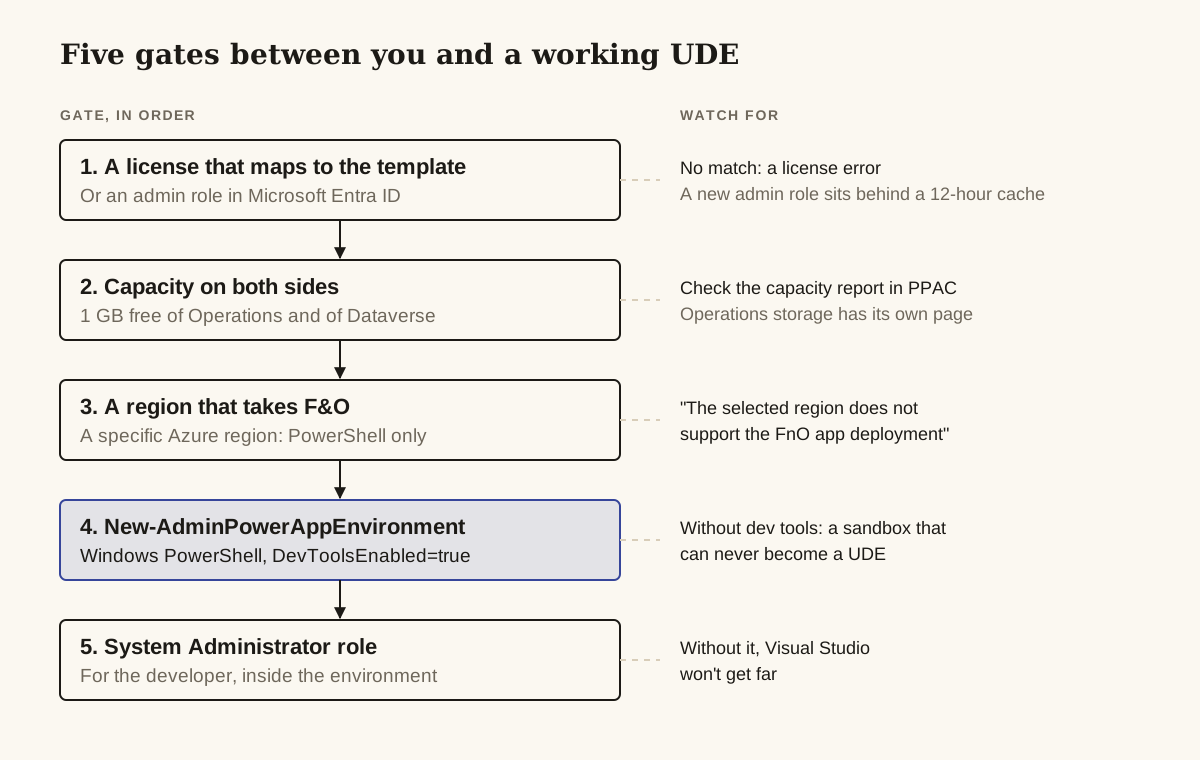
1. A license that maps to a template. The account that runs the command needs an assigned license that allows F&O provisioning, and that license decides the template you pass:
| License | Template name | Template id |
|---|---|---|
| Dynamics 365 Finance | Finance (preview) | D365_FinOps_Finance |
| Dynamics 365 Supply Chain Management | Supply Chain Management (preview) | D365_FinOps_SCM |
| Dynamics 365 Project Operations | Project Operations Integrated (preview) | D365_FinOps_ProjOps |
| Dynamics 365 Operations Application Partner Sandbox | Project Operations Integrated (preview) | D365_FinOps_ProjOps |
| Dynamics 365 Commerce | Commerce (preview) | D365_FinOps_Commerce (trials only) |
Partners and ISVs, note the Partner Sandbox row: it maps to Project Operations, not Finance. Pass a template your license doesn’t cover and expect You don't have the required Dynamics 365 licenses to create a database with <app name> Dynamics app.
The exception: users with the Power Platform Administrator or Dynamics 365 Administrator role in Microsoft Entra ID don’t need a full user license to create these environments. A newly assigned role sits behind a 12-hour cache, so an unlicensed admin who was granted the role this morning may still be blocked from provisioning this afternoon.
2. Capacity on both sides. Microsoft’s provisioning tutorial requires at least 1 GB free of Operations database capacity and 1 GB free of Dataverse database capacity. Microsoft’s TechTalk says to validate role and license in the Microsoft 365 admin center first, then check the capacity report in the Power Platform admin center (PPAC). Operations storage has its own page under Licensing > Capacity add-ons > Finance and Operations.
The cost model for developer environments changes here. LCS sold environment slots; PPAC grants storage and Power Platform Requests with your licenses, and Microsoft says there are no strict limits on how many environments you can create. For capacity pricing, go to the Dynamics 365 Licensing Guide.
3. A region that takes F&O. Microsoft’s environment types page lists secondary Azure regions that accept only UDE and trial environments: australiasoutheast, canadaeast, francesouth, southindia, norwaywest, southafricawest, switzerlandwest and ukwest. You can target a specific Azure region only from PowerShell.
Once the environment exists, the developer’s account also needs the System Administrator role inside it, or Visual Studio won’t get far.
How do you provision a UDE with PowerShell?
You provision a UDE with New-AdminPowerAppEnvironment in Windows PowerShell, passing DevToolsEnabled=true in the template metadata. Microsoft states that the Power Platform admin center UI can’t currently create developer-focused sandbox environments with finance and operations apps, so there is no button (one edge case needs the API, below). And it has to be Windows PowerShell, not PowerShell 7.
Install the admin module and sign in:
Install-Module -Name Microsoft.PowerApps.Administration.PowerShell
Add-PowerAppsAccount -Endpoint prod
Build the template metadata; DevToolsEnabled=true is what makes this a UDE rather than an ordinary sandbox:
$jsonObject= @"
{
  "PostProvisioningPackages":
  [
    {
      "applicationUniqueName": "msdyn_FinanceAndOperationsProvisioningAppAnchor",
      "parameters": "DevToolsEnabled=true|DemoDataEnabled=true"
    }
  ]
}
"@ | ConvertFrom-Json
Then create the environment, swapping in your name, template and location:
New-AdminPowerAppEnvironment -DisplayName "MyUniqueNameHere" -EnvironmentSku Sandbox -Templates "D365_FinOps_Finance" -TemplateMetadata $jsonObject -LocationName "Canada" -ProvisionDatabaseWhere this bites:
- The name. It must be globally unique because it becomes part of the F&O URL. The admin overview caps it at 20 characters, while the provisioning tutorial says “under 20”. Use 19 or fewer and neither page can object.
MacroRegionRequired. Depending on tenant eligibility and rollout state, some requests need a macro region. The PowerShell module has no parameter for it, so Microsoft’s fix is to call the Provision New Environment API withmacroRegionin the request body.- Silent failure. If the environment shows as preparing in PPAC and then disappears, provisioning failed. Microsoft’s advice is to contact Support with the environment name and tenant ID.
- Cleanup.
Remove-AdminPowerAppEnvironment -EnvironmentName [Guid]deletes it. Reset isn’t implemented yet for environments carrying the F&O provisioning app.
Microsoft’s June 2024 UDE general availability announcement put new-environment setup at “less than 2 hours”, against 4 to 6 hours for a cloud-hosted VM. That’s Microsoft’s figure; we haven’t timed it.
What does Visual Studio download, and where does it go?
For a UDE, Visual Studio downloads four finance and operations assets, including the system metadata in PackagesLocalDirectory.zip, into C:\Users\<User>\AppData\Local\Microsoft\Dynamics365\<ApplicationVersion>. Before you connect, check the workstation:
- Windows 10 or 11, with at least 16 GB free on the system drive.
- Visual Studio 2022 Professional or Enterprise, with at least the .NET desktop development workload and the Modeling SDK. Report work also needs the report-design components the requirements page lists.
- LocalDB, which comes with Visual Studio 2022.
Go by the current requirements page, which lists Professional and Enterprise only; Microsoft’s 2024 GA post said any SKU would do, but the requirements page is the newer of the two. Whether Community edition works isn’t stated, so don’t plan a team’s licenses around it.
Install the Power Platform Tools extension, then pick one of two commands on the Tools menu:
- Connect to Dataverse downloads the F&O assets only if they aren’t already on the machine.
- Download Dynamics 365 FinOps assets always downloads them. It’s the FAQ’s answer for redownloading assets.
| File | What it is |
|---|---|
PackagesLocalDirectory.zip | The system metadata, extracted to a PackagesLocalDirectory folder |
Microsoft.Dynamics.FinOps.ToolsVS2022.vsix | The finance and operations extension for Visual Studio |
DYNAMICSXREFDB.bak | A backup of the cross-reference database |
TraceParser.msi | Listed without a description; by its name, the Trace Parser installer |
With Auto setup for Dynamics 365… on (the default, under Tools > Options > Power Platform Tools), the extension extracts the metadata and creates the configuration for you. To configure by hand, use Extensions > Dynamics 365 > Configure Metadata.
Only one configuration is active at a time, a change applies to new Visual Studio instances, and the cross-reference server is (localdb)\. for LocalDB or localhost for full SQL Server. On versions before 10.0.39, Configure Metadata can be missing; opening Extensions > Dynamics 365 > Infolog and retrying brings it back.
Connecting to a customer tenant as a guest: under Tools > Options > Power Platform Tools, select Skip Discovery, clear all the login checkboxes and type the Dataverse URI yourself. With MFA, clear every checkbox on the login screen.
How do build, deploy and debug work when code only runs in the cloud?
With a UDE, you compile X++ locally in Visual Studio, push it to the cloud runtime through one of five deploy routes, and attach the debugger to the cloud AOS. Microsoft’s own wording is that X++ code can only be executed in the cloud, so every “works on my machine” question becomes a deployment question.
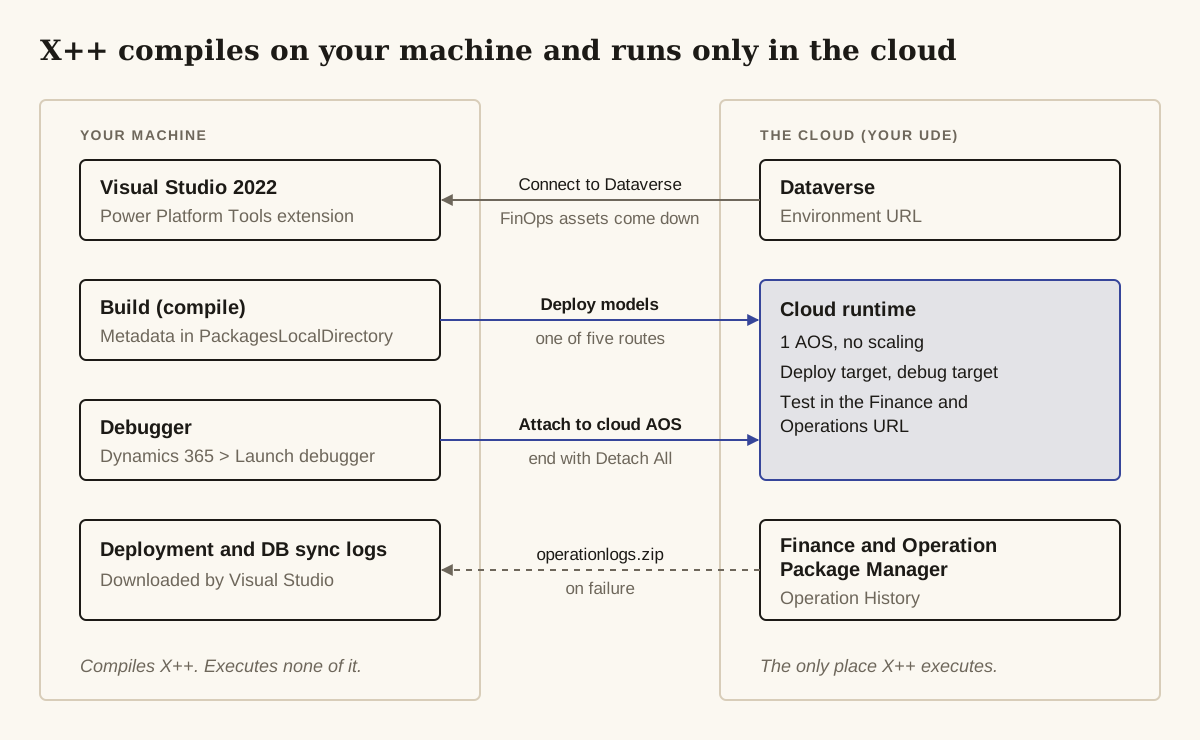
Create a model as usual with Extensions > Dynamics 365 > Model management > Create model…, then choose how to push it:
| Route | What it deploys | Database sync |
|---|---|---|
| Dynamics 365 > Deploy > Deploy models … | Full model | Optional |
| Dynamics 365 > Build models with Deploy to connected online environment | Full model | Follows the synchronize setting on the same Options tab |
| Incremental build with Deploy changes to online environment = true | Changes only | Follows the project’s Synchronize database setting |
| Right-click project > Deploy model for project … | Changes only | No |
| Dynamics 365 > Synchronize database… | Nothing | Sync only |
The fourth route is the quick one and the dangerous one. Microsoft says it deploys changes but doesn’t synchronize the database for the module, so a new table field reaches the server without a sync. Use a route that syncs whenever tables, views or data entities change. Microsoft-shipped packages you reference aren’t redeployed; they’re already on the server.
The 2024 tutorial labels the first route Deploy Models to Online Environment in one place and Deploy models … in another, so expect the label to differ slightly in your build of the extension. Progress shows in the output window under the FinOps Cloud Runtime drop-down, with a log link at the end.
To debug, attach to the cloud AOS with Dynamics 365 > Launch debugger. When you’re done, detach: Stop Debugging restarts the runtime, and the FAQ says to use Detach All instead.
Two more cloud-only rules. Unit tests must be deployed before they run, with Application Foundation and Test Essentials as model dependencies. And Microsoft points you to Application Insights to monitor and diagnose code running in the environment.
Where do you look when a deployment fails?
When a UDE deployment fails, the real error is in Dataverse, not the Visual Studio error list: download the failed operation’s operationlogs.zip from the Finance and Operation Package Manager app. A model can build cleanly and still fail to deploy; Microsoft says deployment can fail at various stages, database sync among them. The daxwork blog walks through exactly that case: a clean build, a failed deployment, and the real error sitting in the operation log.
The path, from Microsoft’s FAQ:
- Sign in to the environment’s Dataverse org.
- Open the Finance and Operation Package Manager app.
- Go to Operation History and open the failed record from the Operation Name column.
- Download
operationlogs.zip.
Package in the app’s left pane lists what has been applied. If the app errors for you even as a Power Platform admin, the daxwork post reports that adding yourself as System Administrator in PPAC (environment Membership > +Add me) fixed it. That’s a community report, consistent with Microsoft’s requirement that developers hold System Administrator in the environment.
Visual Studio downloads the logs automatically on failure, or every time if you enable the setting under Tools > Options > Power Platform Tools (the install guide names the option Download logs…, for deployment and DB sync logs). Locally, look for Microsoft.PowerPlatformVSExtension*.log in C:\Users\<user>\AppData\Local\Microsoft\Dynamics365\Logs, plus VisualStudioD365Extension*.log under the Roaming Visual Studio folder.
If you end up with Support, take the correlation ID from the output pane, the machine name and a timestamp.
Two errors aren’t your code:
EnvironmentNotInReadyState: the environment isn’t ready yet. Wait a few minutes, check that the F&O URL opens, then retry.Request aborted. FinOps Environment state is: PostServicingFailed. Retry after confirming that the environment is 'Running'.The forum post below reports it appearing while PPAC shows the environment as Ready. We found no Microsoft documentation for it.
Which versions, ISV packages and licenses work?
You can’t pick the F&O version of a UDE, ISV code goes in as reference metadata, and Visual Studio support is the part still moving.
Version. Templates install the latest version available at that moment, and Microsoft’s UDE FAQ says version selection is planned but not available. To match a sandbox or production version, copy that environment into the UDE; in PPAC a copy brings code along with data. Quality updates are scheduled for unified environments the same way as for LCS-managed ones.
ISV modules. Put them in a common folder and add that folder to the reference metadata folders of the active configuration.
ISV licenses. Place the license file in a __License folder (two underscores) in the model, at the same level as bin. It’s applied on deploy, and it takes effect only after a Full DB Sync from the Dynamics 365 menu under Extensions.
Old LCS packages. UDE uses the Power Platform unified package format. Convert a legacy deployable package with ModelUtil.exe from the bin folder, using -convertToUnifiedPackage with the package zip and an output location. Azure DevOps pipelines can still produce LCS-style deployable packages.
Visual Studio version. As of October 28, 2026, the UDE tooling targets Visual Studio 2022. Microsoft’s 10.0.47 release notes said Visual Studio 2026 was known not to work with the UDE workloads: stay on 2022 until further notice. Microsoft’s 10.0.49 notes then announced that from platform update 75 (PU75), only Visual Studio 2026 is supported for X++ development.
Neither the 10.0.49 nor the 10.0.50 notes say which 10.0.x release PU75 will be, and as of October 28, 2026 we found no Microsoft statement confirming that UDE tooling works with Visual Studio 2026. Some partner commentary puts the cutoff at PU74; Microsoft’s own notes say PU75. Don’t upgrade a UDE workstation to Visual Studio 2026 on the strength of either: wait until the platform release notes say the UDE tooling works with it. Our Visual Studio 2026 and X++ release watch tracks the PU75 cutoff, the build pipeline change and the signals that it’s safe to switch.
Limits and gotchas at a glance
| Symptom | Cause | Fix |
|---|---|---|
You don't have the required Dynamics 365 licenses to create a database with <app name> Dynamics app. | No license for the template you passed | Match license to template; an admin role assigned in the last 12 hours may not be recognized yet |
| Provisioning cmdlets misbehave | Running in PowerShell 7 | Use Windows PowerShell |
MacroRegionRequired | Tenant rollout needs a macro region | Use the Provision New Environment API with macroRegion |
The selected region does not support the FnO app deployment | Provisioning app installed on an org in an unsupported region | Use a supported region |
| Environment appears in PPAC, then vanishes | Provisioning failed | Support, with environment name and tenant ID |
| No metadata download prompt in Visual Studio | Trial or non-UDE environment | Provision a Sandbox-type UDE |
| Configure Metadata missing | Known issue before 10.0.39 | Open Infolog, retry |
| Clean build, failed deploy | A deployment stage such as DB sync failed | operationlogs.zip in Package Manager |
| Package Manager errors for an admin | No System Administrator role in the environment (community report) | PPAC Membership > +Add me |
EnvironmentNotInReadyState | Environment not ready | Wait, check the F&O URL, retry |
PostServicingFailed while PPAC says Ready | Not documented by Microsoft | Community workaround: toggle Administration mode |
... is missing prvCreatemsprov_fnopackage privilege | Missing Dataverse privilege | Contact Support |
| Runtime restarts after debugging | You used Stop Debugging | Use Detach All |
| ISV license not active | No full sync after deploy | Full DB Sync |
When should you not use a UDE?
Don’t use a UDE when more than one person needs the same environment. Microsoft positions a UDE as single-developer only and says it isn’t suitable for multi-user development or performance testing. With a single AOS and no scaling, it also can’t stand in for a scaled sandbox for load or batch-throughput testing. Use a USE for shared testing and load work, and give each developer a UDE.
Build VMs don’t carry over either. Microsoft’s unified admin overview lists LCS build environments as not implemented in the unified experience and points you to Microsoft-hosted agents in Azure DevOps with the latest Dynamics 365 Finance and Operations Tools extension, so plan the pipeline move alongside the developer move.
Keeping a cloud-hosted VM a little longer is reasonable only if you already have one. Microsoft froze new LCS project creation for new customers from February 16, 2026, with an exception request process, so a new customer usually has no LCS project to deploy a cloud-hosted VM from. Teams that do still run one should note the Visual Studio 2022 cutoff at PU75: whichever environment you develop on, the IDE moves.
Questions people ask
Can I create a unified developer environment from the Power Platform admin center?
No. Microsoft states that the UI can't currently create developer-focused sandbox environments with finance and operations apps. Use New-AdminPowerAppEnvironment in Windows PowerShell with DevToolsEnabled=true in the template metadata.
Why does UDE provisioning fail with a Dynamics 365 license error?
The account running the command needs a license that maps to the template, such as Dynamics 365 Finance for D365_FinOps_Finance, or the Power Platform Administrator or Dynamics 365 Administrator role in Microsoft Entra ID. A newly assigned admin role can take up to 12 hours to be recognized.
Can I provision a UDE from PowerShell 7?
No. Microsoft's UDE FAQ says to use Windows PowerShell, not PowerShell 7. Install Microsoft.PowerApps.Administration.PowerShell and run New-AdminPowerAppEnvironment from a Windows PowerShell session.
Why doesn't Visual Studio offer to download metadata when I connect?
The environment isn't a Sandbox-type UDE. A Trial environment or another non-UDE environment won't trigger the metadata download, however much it looks like F&O in the browser. Provision a Sandbox-type UDE with DevToolsEnabled=true.
Can I choose the F&O version of a new UDE?
No. A new UDE gets the latest available version, and Microsoft says version selection is planned but not available. To match a sandbox or production version, copy that environment into the UDE.
Sources and further reading
- Frequently asked questions (unified developer experience)Microsoft Learn
- Tutorial: Provision a new environment with an ERP-based templateMicrosoft Learn
- Install and configure development toolsMicrosoft Learn
- Tutorial: Write, deploy, and debug X++ codeMicrosoft Learn
- Unified environment types and templates for finance and operations appsMicrosoft Learn
- Overview of unified admin experience for finance and operations appsMicrosoft Learn
- Finance and operations storage capacityMicrosoft Learn
- TechTalk: Unified developer experience for Dynamics 365 finance and operations apps and customer engagement appsMicrosoft Learn
- The Unified Development Environment is GA! (Microsoft Power Platform Developer Blog)Microsoft Developer Blogs
- Visual Studio requirements for X++Microsoft Learn
- Platform updates for version 10.0.47 (January 2026)Microsoft Learn
- Platform updates for version 10.0.49 (July 2026)Microsoft Learn
- Platform updates for version 10.0.50 (December 2026)Microsoft Learn
- Removed or deprecated platform featuresMicrosoft Learn
- Visual Studio 2026 and Platform Update 74: What D365 F&O Developers Need to Know (Logan Consulting)loganconsulting.com
What changed
- Key facts made more precise: the admin center can't currently create a UDE, capacity is at least 1 GB with a supported region, and Visual Studio 2026 support for UDE is unconfirmed.
- First published.
Was this page helpful?